Yeah, my other preference in the past has been to design the ends using 2 slabs and attach them using visual logic. Then just size a quad as normal.
Original Message:
Sent: 04-27-2023 12:32
From: MalThePal
Subject: Setting Keyframes for a Slab Width and Height
This just came to my memory. I had pill shaped L3 super backgrounds that had to size. I cut the pill in half vertically and applied each half to a separate material layer and I could then modify the material position in the quad. Can you design your slab in photoshop and size it that way?
------------------------------
Malcolm Thorpe
Free Lance Xpression Designer/Carbonite TD
------------------------------
Original Message:
Sent: 04-27-2023 11:54
From: Red
Subject: Setting Keyframes for a Slab Width and Height
No worries, they thing is either get an existing anim from a track or if you create one you're going to need to put it somewhere.
I don't want to confuse things but here's a script I wrote that decides if something should be a ticker and if its a ticker should it tick or if its to long should it crawl and then tick.
But you'll see the principle of what I am doing getting scene directors, scene directors tracks, anim directors and deleting, placing them etc.
dim OgText, targetText, Total, Count as xpTextObject
Scene.GetObjectByName("FldA",OgText)
Scene.GetObjectByName("TICK_FldA",targetText)
Scene.GetObjectByName("Total",Total)
Scene.GetObjectByName("Count",Count)
dim arr() as string = split(OgText.text,"|")
targetText.text = arr(0)
'engine.debugmessage(arr.length,0)
Total.Text = arr.length
Count.Text = 1
dim sd as xpSceneDirector
dim tr as xpSceneDirectorTrack
dim cp, res as xpSceneDirectorClip
dim anim as xpAnimController
dim txGrp as xpBaseObject
'Get Text Groups
scene.GetObjectByName("TICKER GRP", txGrp)
'clean out old anim keyframes
scene.GetSceneDirectorByName("Ticker_Crawl", sd)
sd.Position = 0
scene.GetAnimControllerByName("TICKER_CRAWL", anim)
scene.DeleteAnimController(anim)
'name crawl place on track
scene.CreateAnimController(anim)
anim.Name = "TICKER_CRAWL"
sd.GetTrackByName("Track1", tr)
tr.CreateAnimClip(0,anim,cp)
'get restart trigger
sd.GetTrackByName("Track2", tr)
tr.GetClipByName("Restart", res)
dim xVal as String = targetText.boundingbox.width
'engine.DebugMessage(xVal, 0)
if xVal < 1701 then
'DON"T ANIMATE TICKER
'engine.DebugMessage("Don't Animate Ticker", 0)
sd.PlayRange(0, 510)
res.Position = 500
txGrp.PosX = 0
else
'ANIMATE TICKER
'engine.DebugMessage("Animate Ticker", 0)
dim endFrame as integer
endFrame = xVal / 2
anim.Duration = endFrame
anim.SetKeyFramePosition(txGrp,0,0,0,0)
anim.SetKeyFrameValueTCB(txGrp, 250, "Position.X", 0, 1, 0, 0)
anim.SetKeyFrameValueTCB(txGrp, endFrame, "Position.X", 1380-xVal, 1, 0, 0)
sd.PlayRange(0, endframe +20)
sd.AutoStop = true
res.Position = endFrame + 10
'engine.DebugMessage("res pos" & res.Position, 0)
end if ' end of crawl script
------------------------------
Simon Redmile
Senior Graphic Programmer & Designer
Ross Video
Bristol United Kingdom
Original Message:
Sent: 04-27-2023 11:48
From: Adam
Subject: Setting Keyframes for a Slab Width and Height
Thank you for this. Will look it over and digest...probably over a large bottle of Cab.
Cheers
------------------------------
Adam
Off the Post Productions
Original Message:
Sent: 04-27-2023 11:26
From: Red
Subject: Setting Keyframes for a Slab Width and Height
Hi Adam, this thread might help you on how to format a script for animation.
https://livinglive.community/communities/community-home/digestviewer/viewthread?MessageKey=97062078-e543-462e-9c07-8430786db772&CommunityKey=91812bfd-9393-4a3f-8a74-7f8035df130
------------------------------
Simon Redmile
Senior Graphic Programmer & Designer
Ross Video
Bristol United Kingdom
Original Message:
Sent: 04-27-2023 10:53
From: Adam
Subject: Setting Keyframes for a Slab Width and Height
Thanks Red. So my orginal question stems bask to scripting syntax....maybe I am not communicating my question correctly.
Here's a sample script on what I am trying to do
dim objSlabOnline, objSlabNew as xpSalbObject
dim animSlab as xpAnimController
dim FB as xpOutputFrameBuffer
dim onlineScene as xpScene
Engine.GetOutputFrameBuffer(FramebufferIndex,FB)
Self.GetObjectByName("Slab1", objSlabNew)
'compare old and new scenes and set banner masks
If FB.GetSceneOnLayer(Layer,onlineScene) Then
onlneScene.GetObjectByName("Slab1", objSlabOnline)
'create animation controller
Self.CreateAnimController(animSlab)
'Here, I want to get the updated width and height of my slab object in preview...ready to air for starting keyframe
animSlab.SetKeyFrame(objSlabNew,0,objSlabOnline.width,objSlabOnline.Height,3,1)
'set ending key frames based on new slab width and height
animSlab.SetKeyFramePosition(objSlabNew,30,objSlabNew.Width,objSlabNew.Height,3,1)
animSlab.Play
End If
Hope this makes sense on what I am trying to do. Thanks Red.
------------------------------
Adam
Off the Post Productions
Original Message:
Sent: 04-27-2023 10:40
From: Red
Subject: Setting Keyframes for a Slab Width and Height
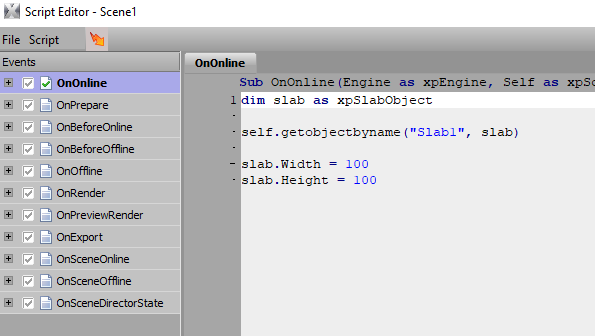
This also works for slab :)
------------------------------
Simon Redmile
Senior Graphic Programmer & Designer
Ross Video
Bristol United Kingdom
Original Message:
Sent: 04-27-2023 10:38
From: Red
Subject: Setting Keyframes for a Slab Width and Height
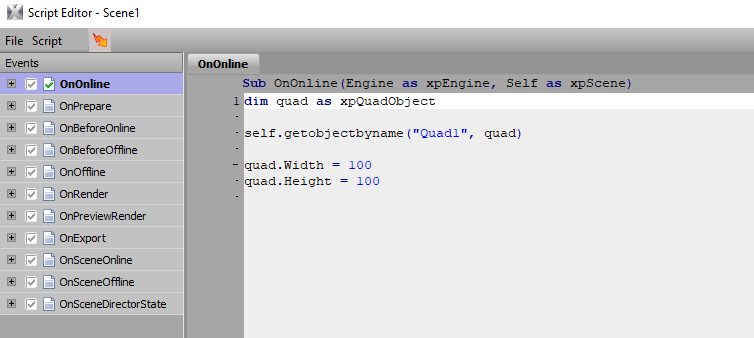
If you use xpQuadObject rather than xpBaseObject you'll find properties like width and height.
------------------------------
Simon Redmile
Senior Graphic Programmer & Designer
Ross Video
Bristol United Kingdom
Original Message:
Sent: 04-27-2023 10:33
From: Adam
Subject: Setting Keyframes for a Slab Width and Height
Thanks for the reply. I actually have looked through the SDK file multiple times. I have tried just about every posible KeyFrame Method including slab-specific methods...none worked. Wondering if width and height are controllable through keyframing and animation controllers. Again thanks for weighing in with the suggestion.
------------------------------
Adam
Off the Post Productions
Original Message:
Sent: 04-27-2023 10:24
From: MalThePal
Subject: Setting Keyframes for a Slab Width and Height
In the Xpression folder is an SDK help file. This lists all the various objects and methods that you can exploit using scripting. Look through the tutorials for one by Jeff Reitman. He explains it in depth and it really helped me out.
------------------------------
Malcolm Thorpe
Free Lance Xpression Designer/Carbonite TD