Basicly, what I want, is to readout data from the json link I have.
I get this for each party:
 logo - percent - +/- percent
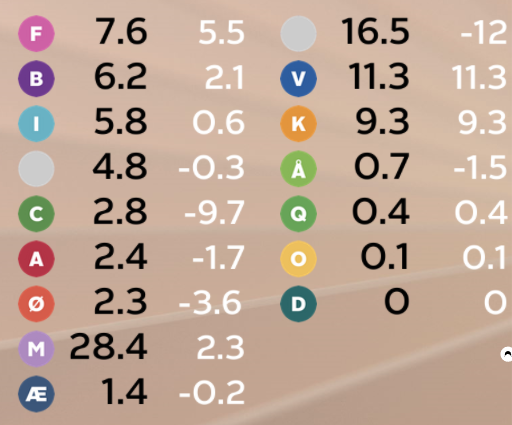 16 partys
These are now all my objects:
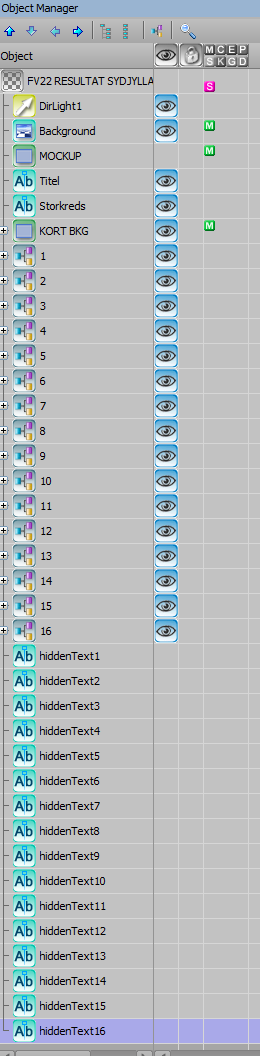
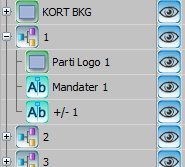
I need to sort the partys, based on the black number and then place them at the right position.
At first, I sortet with visual logic, but i did'nt sort them right.
Therefore I need to sort them another way.
I have tried as you describe, IT works, when I put it on the OnRender in scrpt!
But I also need to move the logo and the +/- with the percent...
------------------------------
Tue Sandbæk
Director / TV-Technician
TV SYD
------------------------------
Original Message:
Sent: 11-11-2022 08:55
From: John Corigliano
Subject: sorting datalinqs data
I'm a little confused right now about what you are trying to do, but here's what I think you want...
The biggest question is about the data source. I think it is a JSON file. As far as I know you can't sort JSON data through the DataLinq Server (anyone?). So you will need to create 15 hidden text objects and assign each text object one field in the data. Then create 15 visible text objects to display the data.
' Load the JSON data from hidden texts to array
' The hidden texts have the DataLinq that ties each one to one entry in the JSON array
Dim data(15) As Double
For i As Integer = 1 to 15
Dim txt As xpTextObject
Self.GetObjectByName("hiddenText" & i, txt)
data(i - 1) = CDbl(txt.Text.Replace(".", ","))
Next
' Now we have the data as numbers we can sort
Array.Sort(data)
Array.Reverse(data)
' Last step, put the sorted data into the visible text objects
For i As Integer = 1 to 15
Dim txt As xpTextObject
Self.GetObjectByName("mandater" & i, txt)
txt.Text = data(i - 1).ToString("N2")
Next
Correct?
------------------------------
JohnCorigliano
Senior Software Engineer
ISC
------------------------------
Original Message:
Sent: 11-08-2022 16:43
From: Tue Sandbæk
Subject: sorting datalinqs data
I've tried this, but doesn't seem to work?
Dim mandater(15) As xpTextObject For i As Integer = 0 To 15 self.GetObjectByName("Mandater " + CStr(i + 1), mandater(i))Next' Create arrayDim a As String() = "mandater(1),mandater(2),mandater(3),mandater(4),mandater(5)".Split(",")
------------------------------
Tue Sandbæk
Director / TV-Technician
TV SYD
Original Message:
Sent: 11-07-2022 09:54
From: John Corigliano
Subject: sorting datalinqs data
Looks like it is sorting alphabetically instead of numerically. You can convert the strings to numbers before sorting. Also, as you have figured out, if your culture uses ',' instead of '.' for decimals you have to either replace the '.' with ',' or use a different culture. Demo:
' Create test array
Dim a As String() = "7.6,6.2,5.8,4.8,2.8,2.4,2.3,28.4,1.4,16.5,11.3,9.3,0.7,0.4,0.1,0".Split(",")
'Create new array with doubles
Dim i As Integer
Dim b As Double() = New Double(a.Length){}
For i = 0 To a.Length-1
b(i) = Double.Parse(a(i).Replace(".", ","))
Next
' Sort reverse
Array.Sort(b)
Array.Reverse(b)
' Test results
For Each s As String In b
Engine.DebugMessage(s, 0)
Next
Too bad we can't use Linq (as far as I know). It would be simpler:
Dim b = a.OrderBy(Function(x) Double.Parse(x.Replace(".", ","))).Reverse()
------------------------------
JohnCorigliano
Senior Software Engineer
ISC
Original Message:
Sent: 11-07-2022 09:22
From: Tue Sandbæk
Subject: sorting datalinqs data
OnSetText in script event on the datalinqed text i've did this:
Text = Replace(Text, ".", ",")
It replaces the dot, but the sorting is still not right.
------------------------------
Tue Sandbæk
Director / TV-Technician
TV SYD