Graphics

 View Only
  • 1.  Spacing text from Microsoft Excel from two different cells

    Posted 03-28-2023 09:00
      |   view attached

    I am a little new at building Ross Expression but anyways. I have an excel document that pulls the data however the first and last name are in different cells. When I datalinq it, I get what you see in the attached picture. A jumbled mess of letters. I've been playing around visual logic and can't seem to figure anything out. Any help would be greatly appreciated. 

    Thank you! 


    ------------------------------
    Jack Novelli
    Video Production Manager
    Columbia Fireflies
    ------------------------------


  • 2.  RE: Spacing text from Microsoft Excel from two different cells

    Posted 03-28-2023 09:17

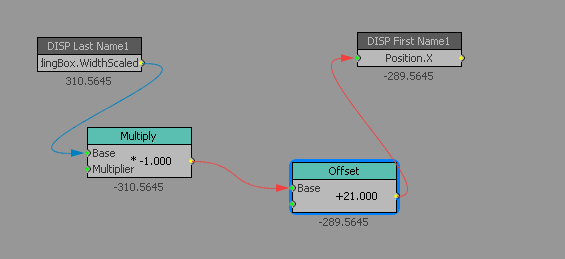
    you can either squeeze to fit to space so they don't move or if you want it to look nice you'll need to do something like this. 

    This is in a scene I happen to be working on at the moment so the multiply by -1 is to make it move left across the screen, you can simply remove that block to make the second name position after the first name. 


    ------------------------------
    Simon Redmile
    Senior Graphic Programmer & Designer
    Ross Video
    Bristol United Kingdom
    ------------------------------


  • 3.  RE: Spacing text from Microsoft Excel from two different cells

    Posted 04-02-2023 11:15
      |   view attached

    More ideas:
    1.  Excel  a new colum and read out of that: =A1&" "&B1 Fristname is in A1 / Lastname in B1
    2. Xpression create 2 Textfields Firstname and Lastname  - then hide them. Create a Name Textfield then VL  as in the picture.
        Sometimes it is easier to have them in one textfield incase you want to put a stagger animation on it or something else.


    ------------------------------
    Nicole Schindeldecker
    FERNSEHGRAFIK
    ------------------------------