You'll want to either set the 'include response' flag to false (which will just give you back the HTTP response body) or you can use JSON.stringify on result.value.
Original Message:
Sent: 06-24-2025 14:24
From: Richard Hills
Subject: SSL Certificates – Disable Hostname Validation
OK with null for data field, I don't get 404 :-)
Now just got to work out how to decode. JSON stringify() works if I don't add the result code flag at the end of the get request.
But seems to fail if I add the result codes, which were printing the 404 message ok in the previous message.
Thank you
------------------------------
Richard Hills
------------------------------
Original Message:
Sent: 06-24-2025 13:49
From: James Peltzer
Subject: SSL Certificates – Disable Hostname Validation
Hi Richard
An error 404 would be generated by the server on your device itself and, given that it works in a browser, there is no clear reason why the server would reply with that exception (they also don't show a 404 in their documentation for that endpoint). Your best bet would be to contact the manufacturer and ask them to provide an explanation.
The only thing you might try here is to set the argument after "application/json" to null instead of an empty string - for a GET the "data" field should always be null to avoid attempting to open a write connection to the HTTP endpoint.
------------------------------
James Peltzer
Ross Video
Original Message:
Sent: 06-24-2025 13:41
From: Richard Hills
Subject: SSL Certificates – Disable Hostname Validation
James,
Thank you for all your help so far. We have had to implement the custom hostname verifier as it is not possible to load custom certificates onto the XDIP units. We have cleared this with the client.
This has sorted the SAN error message, but now I keep getting 404 messages for URLs validated in the browser and Bruno api testing tool.
function callback(result){
   ogscript.debug(JSON.stringify(result))
}

ogscript.asyncHTTP("https://192.168.0.82:8443/api/channels/connected", "GET", "application/json", "", callback, true);
this returns
{"responseCode":404,"url":"https://192.168.0.82:8443/api/channels/connected"}
Bruno retuns:
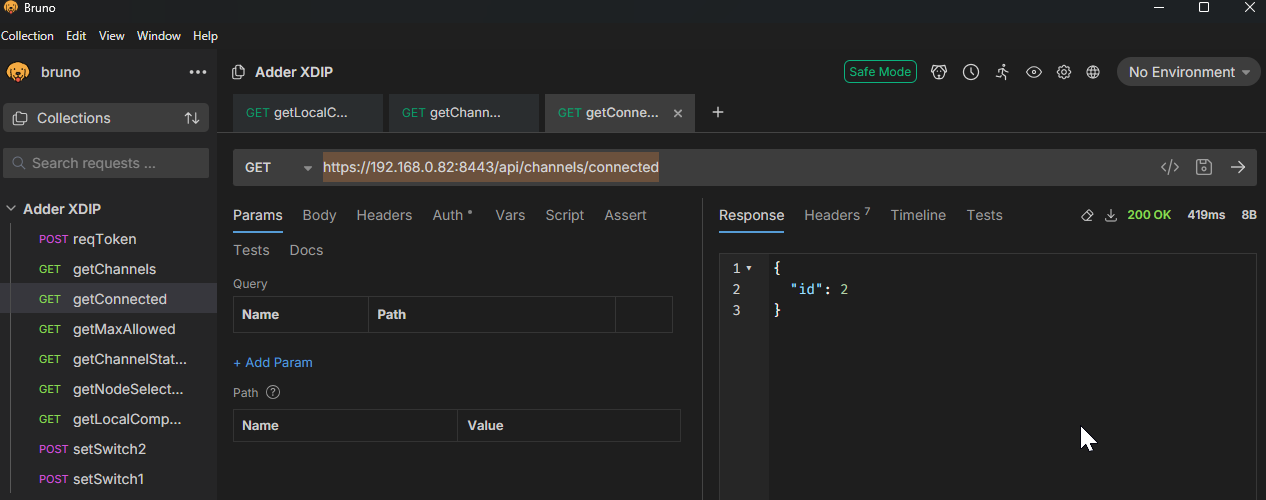
below was the http get generated by bruno
GET /api/channels/connected HTTP/1.1 Content-Type: application/json Host: 192.168.0.82:8443
The protocol documentation is on the following link Adder Support Wiki | XDIP: Using the API
What am I doing wrong? is this anything to do with the custom host name validator?
------------------------------
Richard Hills
Original Message:
Sent: 06-18-2025 11:17
From: James Peltzer
Subject: SSL Certificates – Disable Hostname Validation
It is not as simple as an INI setting but it is possible to override the hostname verifier via ogScript and its access to the raw Java backend that is present in regular DashBoard code. This workaround will not work in Custom Panels on RPM as they are sandboxed to avoid access to raw Java calls.
WARNING: Once you disable the validation, you've eliminated the security mechanisms guarding against man-in-the-middle attacks for all HTTPS calls made from DashBoard until the application is restarted. We would consider this 'internal testing only' quality and do not recommend its use on any kind of publicly-accessible network (the correct solution would be to fix your certificate to include a proper IP or hostname as the CN or SAN).
I will send you a direct message with an example of the required ogScript code.
------------------------------
James Peltzer
Ross Video
Original Message:
Sent: 06-18-2025 11:09
From: Richard Hills
Subject: SSL Certificates – Disable Hostname Validation
James,
I have attached some screenshots.
Would you know how to write a custom 'Host Validation Function'?
or is there a simple ini file entry? The system will be on an isolated network.
------------------------------
Richard Hills
Original Message:
Sent: 06-18-2025 10:56
From: James Peltzer
Subject: SSL Certificates – Disable Hostname Validation
Hi Richard
If the certificate is using a common name of localhost, it probably isn't intended for access from another machine. Are you able to generate a new certificate for your device that uses its actual hostname? I'm a little surprised your browser or any other remove connection isn't complaining about trying to access a 'localhost' certificate.
If it were anything but 'localhost' you could even manually add the hostname to your hosts table as a workaround.
------------------------------
James Peltzer
Ross Video