Hi Nick
Which switcher are you looking to do this with? For a Carbonite or Graphite, each bus will be represented by a parameter (MEx PGM, MEx Keyx, etc.). You can write ogScript that gets the values of each of the 2 bus parameters and then swaps their values. The OIDs of these parameters will change depending on which version of which switcher you are using.
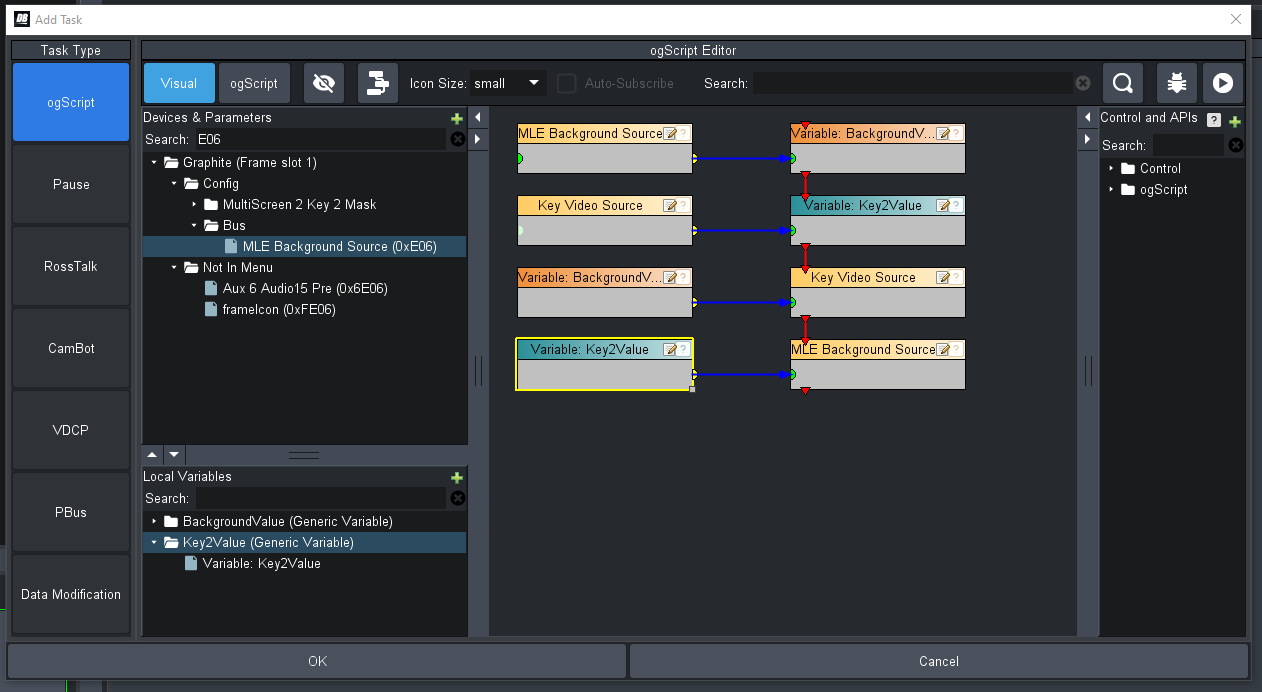
The code generated here would be:
var BackgroundValue = "";var Key2Value = "";BackgroundValue = params.getValue('0xE06', 0);Key2Value = params.getValue('0xDF9', 0);params.setValue('0xDF9', 0, BackgroundValue);params.setValue('0xE06', 0, Key2Value);If you look at the Buses tab of the Live Assist screen and use the "Param Inspector" feature, you should be able to find the appropriate OIDs for your switcher.
Cheers
James
------------------------------
James Peltzer
Ross Video
------------------------------