Hi Ilana
This looks like you are using the XPresssion Visual Logic. You'll want to post in their community page for that team to see your question and provide you some help.
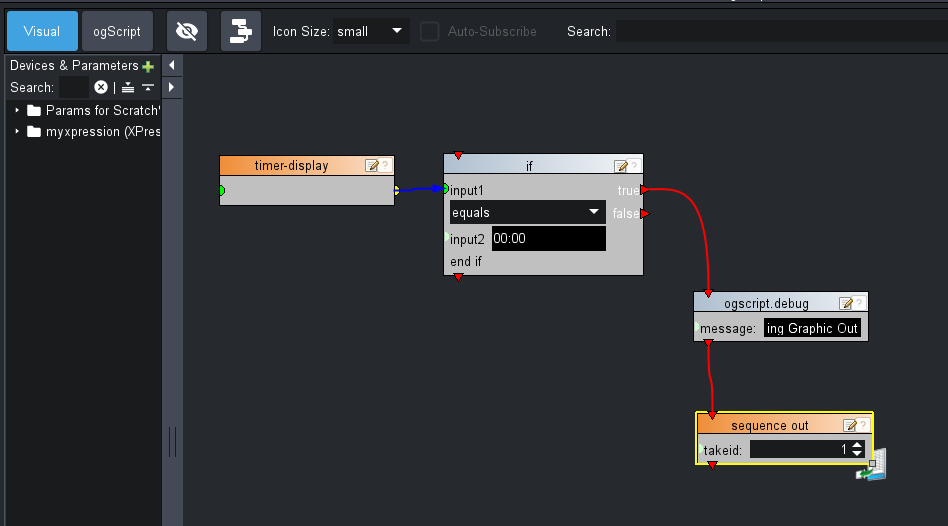
If you'd like options for how to handle this in DashBoard (for example, have DashBoard's Visual Logic send a RossTalk message to XPression when the counter is done), here is a quick example that will achieve this:
<abs contexttype="opengear" gridsize="20" keepalive="true">
<meta>
<lookup id="hosts">
<entry key="myxpression.scriptport">true</entry>
<entry key="myxpression.color">-1145302</entry>
<entry key="myxpression.rtsystem">rosstalk</entry>
<entry key="myxpression.port">params.getValue('myxpression_RossTalkPort', 0)</entry>
<entry key="myxpression.xport">params.getValue('myxpression_RossTalkExPort', 0)</entry>
<entry key="myxpression.host">params.getValue('myxpression_IPAddress', 0)</entry>
<entry key="myxpression.scripthost">true</entry>
<entry key="myxpression.scriptrosstalkex port">true</entry>
<entry key="myxpression.devicetype">XPression</entry>
</lookup>
<params>
<param access="1" maxlength="0" name="timer-display" oid="timerdisplay" type="STRING" value="00:00" widget="label"/>
<param access="1" maxlength="0" name="myxpression_IPAddress" oid="myxpression_IPAddress" type="STRING" value="localhost" widget="0"/>
<param access="1" maxlength="0" name="myxpression_RossTalkExPort" oid="myxpression_RossTalkExPort" type="STRING" value="8020" widget="0"/>
<param access="1" maxlength="0" name="myxpression_RossTalkPort" oid="myxpression_RossTalkPort" type="STRING" value="7788" widget="0"/>
</params>
</meta>
<timer autostart="false" id="my-timer" pattern="mm:ss" rate="500" start="00:10" stop="00:00">
<timertask tasktype="ogparamset">params.setValue('timerdisplay', 0, event.getDisplay());</timertask>
</timer>
<param expand="true" height="80" left="100" oid="timerdisplay" style="style:timerLabel;" top="60" width="260">
<task tasktype="ogscript">
/*! block id=1001,1000,1003,1002 !*/
if (params.getValue('timerdisplay', 0) == "00:00")
{
ogscript.debug("Taking Graphic Out");
rosstalk.sendMessage(params.getValue('myxpression_IPAddress', 0), params.getValue('myxpression_RossTalkPort', 0), "SEQO " + 1)
} else {
}
/*!!
<block id="1001" type="if" x="358" y="128" w="268" INPUT1="ID:1000" OPERATION="equals" INPUT2="00:00" TRUE="ID:1003" FALSE="" IGNORE="" />
<block id="1000" type="param__top&amp;timer-display (timerdisplay)[0]" x="72" y="139" w="243" SET="" />
<block id="1003" type="ogscript_debug" x="697" y="295" w="243" MESSAGE="Taking Graphic Out" next="ID:1002" />
<block id="1002" type="myxpression_xpression_seqo" x="691" y="395" w="243" color="#ee862a" TAKEID="1" />
!!*/
/*!!<checksum>61cf8474fbde2b4793bb0fedbfcd1591</checksum>!!*/</task>
</param>
<simplegrid height="80" left="80" rows="1" top="160" width="300">
<button buttontype="push" name="Start">
<task tasktype="timercontrol">ogscript.getTimerManager().getTimer('my-timer').startTimer(false);</task>
</button>
<button buttontype="push" name="Stop">
<task tasktype="timercontrol">ogscript.getTimerManager().getTimer('my-timer').stopTimer(false);</task>
</button>
<button buttontype="push" name="Start">
<task tasktype="timercontrol">ogscript.getTimerManager().getTimer('my-timer').resetTimer();</task>
</button>
</simplegrid>
</abs>
The DashBoard Visual Logic script looks like this:
Cheers
James
------------------------------
James Peltzer
Ross Video
------------------------------