Wajahat,
You'll need to set some default frames for your Back-to-Back scene directors, otherwise your top text is staying hidden behind the top mask, and the bottom text behind the bottom mask. The reason for this is when you update your text, you're animating the objects on the Y position. But when you animate the scene in, the text is only keyframed to move on the X position. Setting the default frame at the start of all 3 back-to-back IN scenes would ensure that your text is at the proper Y position when the IN and OUT animations occur.
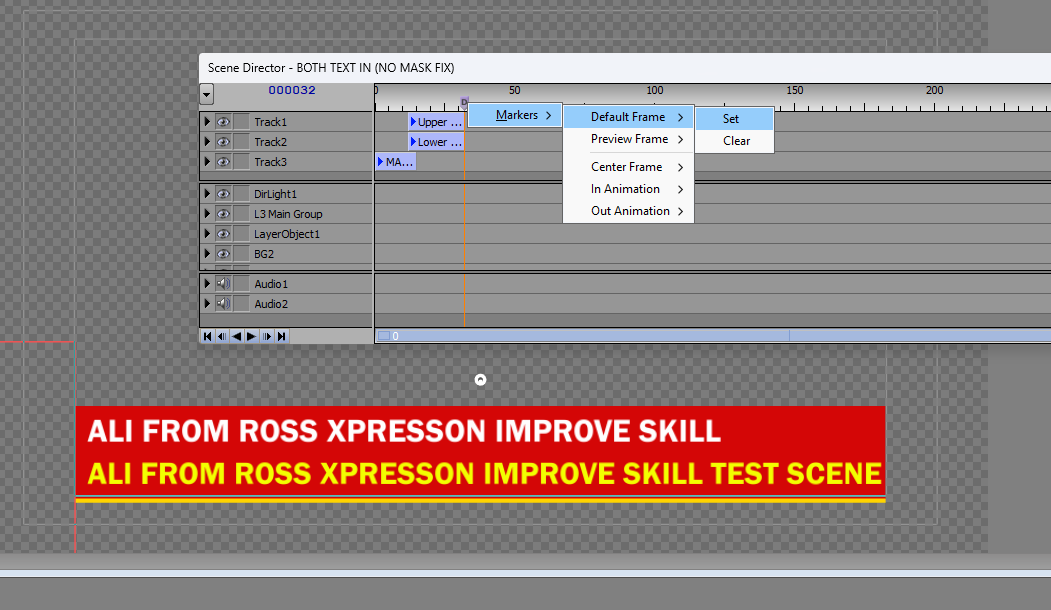
Looking a bit further ahead, you'll want to adjust the size of your Mask 1 so the yellow bar at the bottom doesn't peak in and out; and add your Mask Fix animation controller to the Lower Text and Upper Text OUT scene directors so the text has a mask to hide behind as it's going out.
------------------------------
Jeff Mayer
Ross Video
------------------------------
Original Message:
Sent: 06-16-2025 07:00
From: Wajahat Ali
Subject: TL MASKING
the way described in the video is what I am saying. but now it's working for somehow have to adopt the same steps taken in Xpression U tut.
------------------------------
[Wajahat] [Ali]
[Team Lead]
[Hum News] [Islamabad] [Pakistan]
------------------------------
Original Message:
Sent: 06-16-2025 06:13
From: Garner Millward
Subject: TL MASKING
What tutorial does not work? An XPression U video? Or just this xpf file you posted?