Perfect .. glad to hear .. we will add the Event to the list though to be available in CCs
Original Message:
Sent: 10-10-2023 21:27
From: Ethan Stump
Subject: TouchDrive CC for Xpression Amp Clip Eject
Updating the device configuration on the Carbonite to enable the ejection worked perfectly for what I was looking to do! Thank you!
------------------------------
Ethan Stump
Director/Technical Director
KSNF 16 TV
------------------------------
Original Message:
Sent: 10-10-2023 20:45
From: Les O'Reilly
Subject: TouchDrive CC for Xpression Amp Clip Eject
Two options there then..
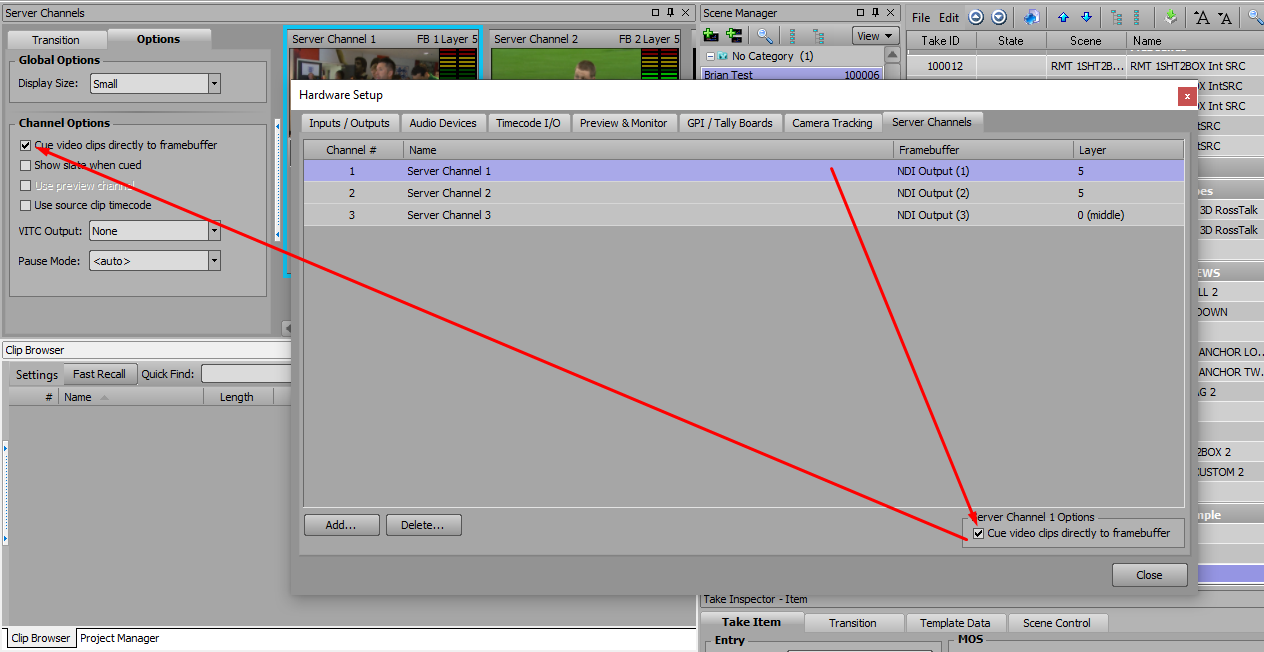
Currently you could FLAG the device setup in the Carbonite to enable the EJECT command be send When CUEing.. this will eject the channel then cue the clip (yes .. the switcher can send EJECT but it does not have a Dedicated EJECT event..)
Also you could change the Clips channels to Load Direct to Channel.. can be done in the Config of the channel or in the options of the channel in the UI..
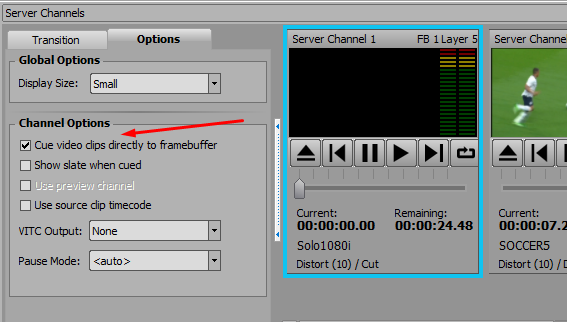
or in this screen .. but they are linked options
------------------------------
Les O'Reilly
Director - Switcher Product Management
Original Message:
Sent: 10-10-2023 20:33
From: Ethan Stump
Subject: TouchDrive CC for Xpression Amp Clip Eject
No issue cueing up another clip. I was just trying to avoid a situation we've run into at our station where a video clip will be deleted from the clip store but the Custom Control on the TouchDrive won't be updated with the name of the new clip. In the past when that has happened it would roll the last clip that was used, so I was hoping to attach an Eject and pause to the beginning of each Custom Control that cues a clip. That way there would be an extra layer preventing us from running the incorrect clip, and we would instead see that no clip was loaded.
------------------------------
Ethan Stump
Director/Technical Director
KSNF 16 TV
Original Message:
Sent: 10-10-2023 18:47
From: Les O'Reilly
Subject: TouchDrive CC for Xpression Amp Clip Eject
is there an issue with just cueing up another clip?
XPression should allow this to cue... Or is the problem that it is holding the previous clip still waiting for the play?
------------------------------
Les O'Reilly
Director - Switcher Product Management
Original Message:
Sent: 10-10-2023 18:13
From: Ethan Stump
Subject: TouchDrive CC for Xpression Amp Clip Eject
Looking at the code (and unfortunately I know very little about coding) it looks like it's sending a vdcp.Stop command, and that's functionally acting as an Eject:
vdcp.stop(params.getValue('ipaddress', 0),9091,1);
And when sending a Stop command through a custom control it acts like a Pause.
------------------------------
Ethan Stump
Director/Technical Director
KSNF 16 TV
Original Message:
Sent: 10-10-2023 16:52
From: Les O'Reilly
Subject: TouchDrive CC for Xpression Amp Clip Eject
There is no Eject Command in the Carbonite to send ... We can look to add that in the future. Has not been a request since you can just cue a clip without ejecting.
What is the DashBoard panel using for Eject? Is it sending a RossTalk GPI event that is setup to control the Eject of a server channel?
------------------------------
Les O'Reilly
Director - Switcher Product Management