I am trying to figure out some Transition Logic and for the life of me I can't figure it out, even with the help of Ross University videos.
I have a graphic that I am trying to trigger and take out with just one button in Dashboard (so I don't have to have different in/out buttons)
I have two scene directors,
One called ANIM:
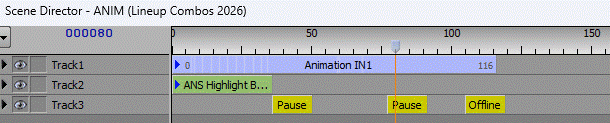
That plays an opening animation to the graphic, pauses for a sponsor read, then pauses again as the sponsor logo and opening animation give way to the graphic. Then one more push of the button takes it offline.
The other scene director I have is just the default SceneDirector1:
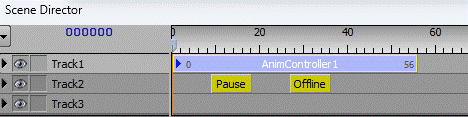
Should just use the default fade in, pause, than default fade out on second button push.
What I am trying to get to happen is that if I go back to back (of the same scene), that it doesn't play the whole intro animation.
I've played around a lot and I just can't seem to get it to work. Sometimes I even break it entirely where I can't even take the scene offline at all.
What are the settings I need to make this work?
------------------------------
Jake Lew
Access Communications Co-Operative Limited
Regina Canada
------------------------------