The script is run when that translogic script rule is true.
OtherScene is relative. So to the oncoming scene other is the currently online scene, to the online scene other is the one coming on.
Scene, as usual, is itself so that could be the scene coming on or the one online.
Hopefully I made sense there?
I am looking for documentation on it but feel free to ask any more questions here and I'll try answer best I can in my rambling ways :)
------------------------------
Simon Redmile
Senior Graphic Programmer & Designer
Ross Video
Bristol United Kingdom
------------------------------
Original Message:
Sent: 07-07-2022 09:49
From: Svetlin Aleksandrov
Subject: Troubleshooting Transition Logic and Animations
Hey Red,
where I can find more info about OnTransLogic script?
• can you create condition to run that rule or the script is runned when the the rule is triggered?
• where OtherScene is pointing? Is it the current online scene?
In general where I can read about it? I can't find nothing about it in the XPression API Documentation.
------------------------------
Svetlin Aleksandrov
Motion Graphic Designer
Euronews Bulgaria
Original Message:
Sent: 07-07-2022 09:04
From: Simon Redmile
Subject: Troubleshooting Transition Logic and Animations
Hey,
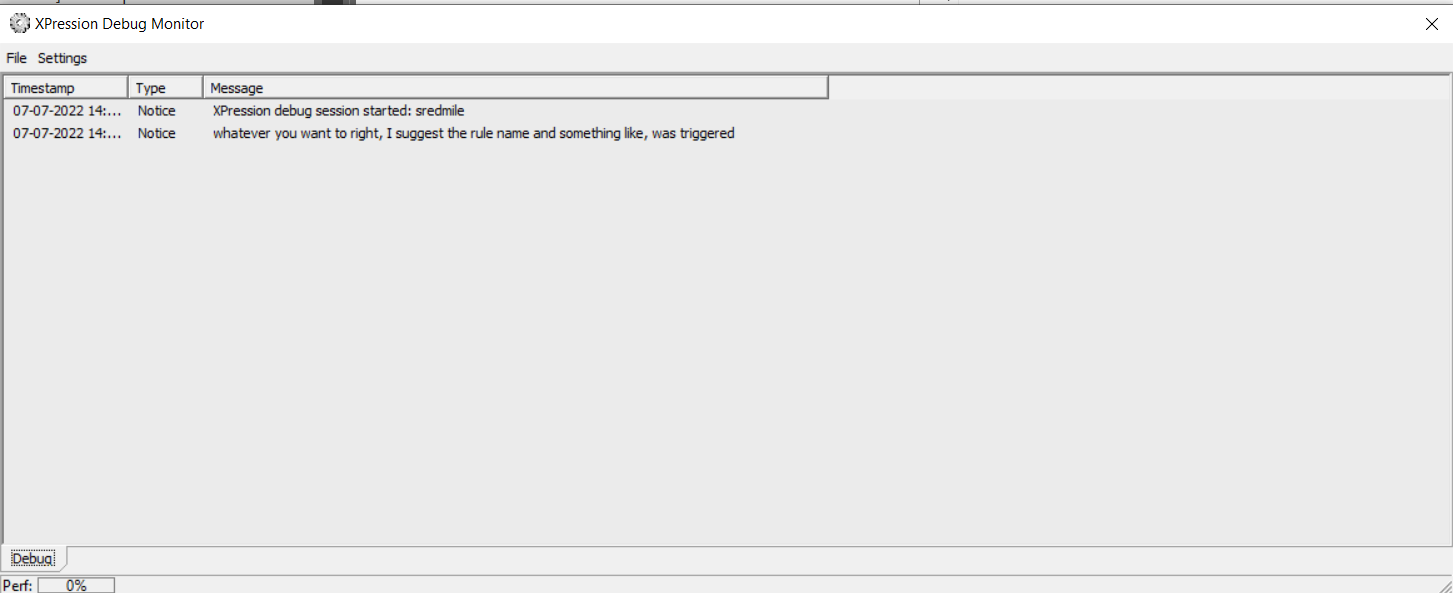
Probably the best way is to put a script in each rule with a debug message.
engine.DebugMessage("whatever you want to right, I suggest the rule name and something like, was triggered", 0)
You can then see which rules are being triggered using the debug monitor which you'll find installed on any machine with XPression.
------------------------------
Simon Redmile
Senior Graphic Programmer & Designer
Ross Video
Bristol United Kingdom
Original Message:
Sent: 07-07-2022 08:51
From: Roger Heyward
Subject: Troubleshooting Transition Logic and Animations
My Questions: How do I troubleshoot Transition Logic to see which scenario is being triggered? And how do I troubleshoot for wonky animation keyframes between Scene Directors?
The Situation: I have inherited a Xpression project that has some pretty intense animations and transition logic. I'm not a complete noobie, but I've been working on this for some time, watched a lot of the Xpression U tuts and still coming up short, so I thought I'd ask the pros here. Basically, I have a graphics package for Election Night coverage with results from different political races on the ballot. Most of the graphics are working just fine, but the issue is regarding the Name Super scene and Lower Third With Results scene. The Lower Third With Results is a Group of scenes that show results by race and is set up to roll through these scenes, so it is continuously "Timed" transitioning from one to the next B2B. Both the Name Super and Lower Third With Results work fine alone. However, when the Name Super is triggered and the Lower Third With Results is Live then an animation for the Lower Third With Results scene to shift down and compress below the Name Super scene. This works fine too. However, at this point the Lower Third With Race Results gets all messed up as it continues to transition between scenes with a new B2B for the compressed look. I've already made a different Scene Director for this situation and when I'm in the Layout mode and I scrub through these B2B in/out Scene Directors the animations work just fine, BUT when I run these scenes LIVE they get all mixed up. A few of the elements go back to the bigger size and location of the default state before the Name Super came in. SO I figure it has to be one of two things: 1)My animations for the "compressed" Lower Third With Results has some keyframe that that should not be there, which reverts it to the bigger Scale/Position; or 2)My Transition Logic is triggering the wrong B2B. I guess my questions are how do I troubleshoot Transition Logic to see which scenario is being triggered? And how do I troubleshoot for wonky animation keyframes between Scene Directors?
------------------------------
Roger Heyward
------------------------------