Facility Control

 View Only
  • 1.  Ultritouch HR and Ultrix Carbonite Blade

    Posted 20 days ago

    Working on building a custom panel for ultritouch that will include a variety of CC but also was hoping to have a handful of buttons from the switcher panel. ME P/P Input 1-4 (cameras) and ME1 Input 7-9 (graphics and media sources) however ive run into a hurtle.

    I can drag these buttons from the switcher live panel to the ultritouch great, however it seems the ultirouch buttons follow the live panel, so if I change the live panel to ME P/P all the buttons are now ME P/P.

    Is there a way to have the ultritouch show switcher buttons from 2 MEs? I realize I can do this with CC but id rather not eat a bunch of customs if I don't need to.

    THanks!


    ------------------------------
    Jonathan Nelson
    Systems Admin
    Grace Church
    Eden Priare United States
    ------------------------------


  • 2.  RE: Ultritouch HR and Ultrix Carbonite Blade

    Posted 16 days ago

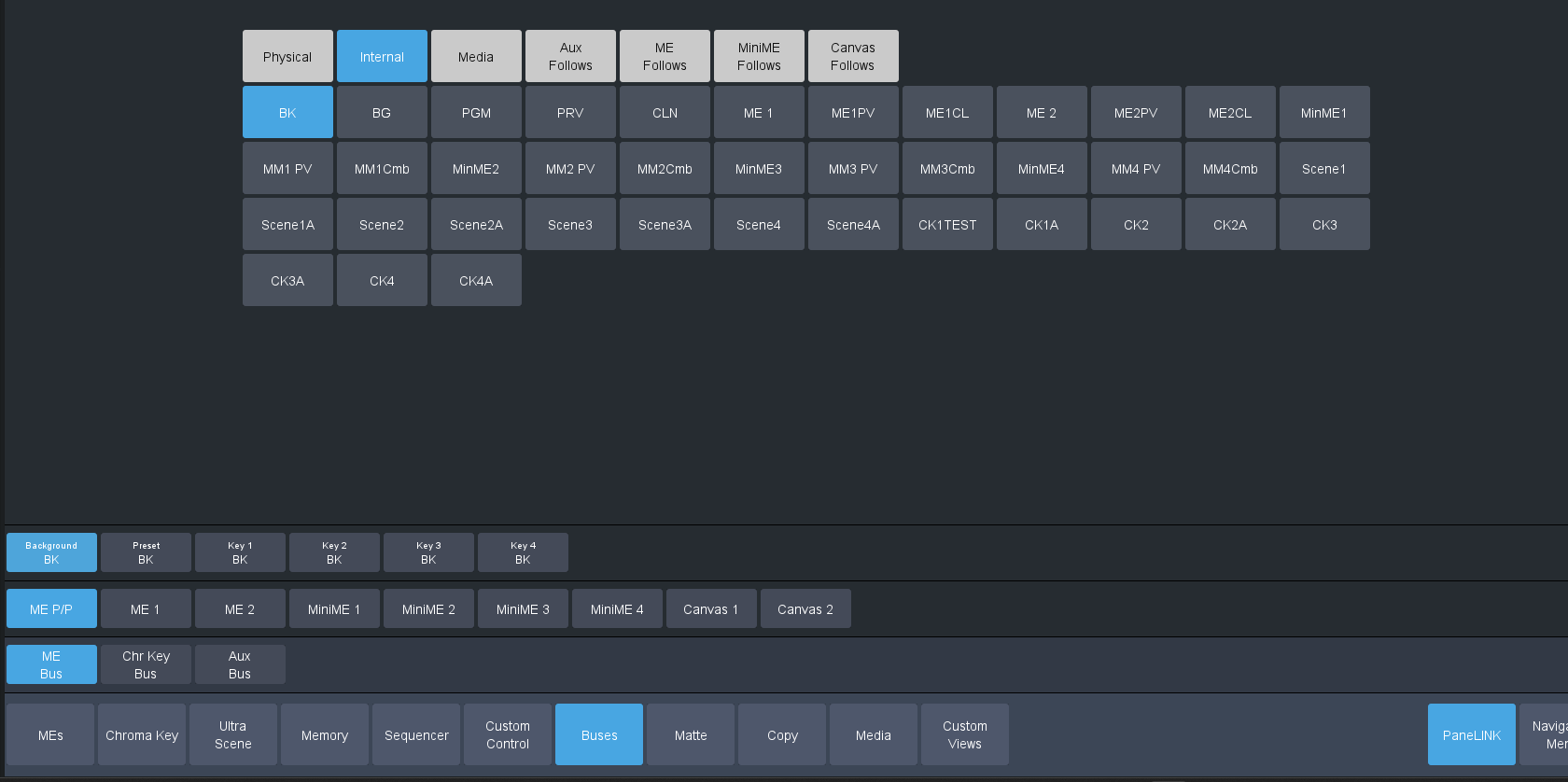
    There are several places where you can grab controls for a Carbonite.  If you want to keep the buttons from a specific ME visible, you should grab the controls from the "Buses" tab of "Live Assist". 


    ------------------------------
    James Peltzer
    Ross Video
    ------------------------------


  • 3.  RE: Ultritouch HR and Ultrix Carbonite Blade

    Posted 16 days ago

    Thanks James,
    This seems close but still not quite working for me. When I attempt to paste a button from within the live assist busses menu it paste the entire group of inputs and not the specific one I copied.
    I have attached a screenshot for reference. I am attempting to create a 1x5 grid filled with buttons I can then paste cameras 1-4 and black into. In image attached I have only pasted once, in this case I copied cam 1 (physical input 1) and then pasted to the first button of the created grid.

    image
    Thanks much for your help! I have on another tab created custom controls that do all the things I need but would rather this work if possible.


    ------------------------------
    Jonathan Nelson
    Systems Admin
    Grace Church
    Eden Priare United States
    ------------------------------


  • 4.  RE: Ultritouch HR and Ultrix Carbonite Blade

    Posted 13 days ago

    Hello Jonathan,

    You can double click the element you added, override the constraint for the parameter, and delete any sources you don't need.
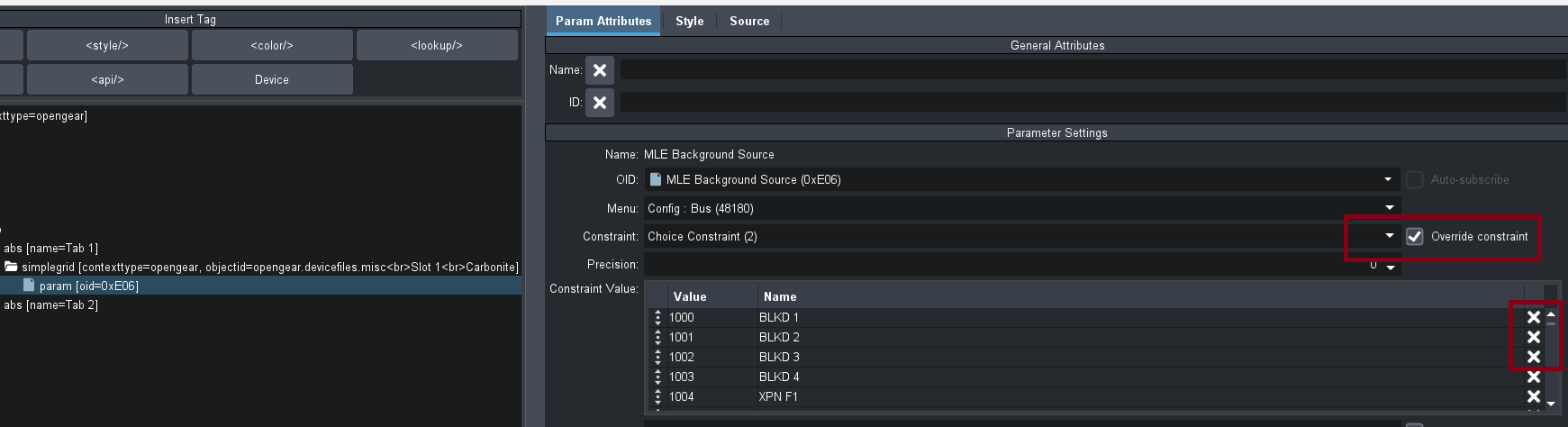
    Then make sure the simple grid is set to 1 row.
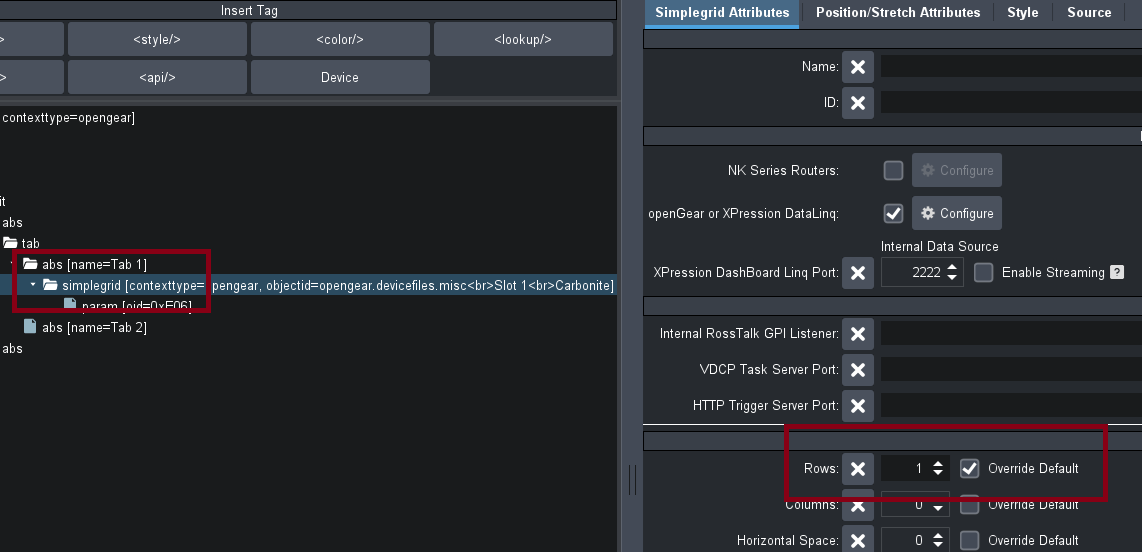
    Let me know if this helps!


    ------------------------------
    Taylor Shane
    Senior Demo & Training Product Specialist - Prime, DashBoard
    M: +1 (682) 800-7115
    Ross Video | Let's make it real
    Visit us at rossvideo.com
    ------------------------------


  • 5.  RE: Ultritouch HR and Ultrix Carbonite Blade

    Posted 13 days ago

    Hello Jonathan,

    After adding the grid if you double click to edit it you can override the parameter's constraint and delete any options you don't need:

    Then select the Simple Grid it's in and make sure it's set to only 1 row.

    Let me know if this helps!


    ------------------------------
    Taylor Shane
    Senior Demo & Training Product Specialist - Prime, DashBoard
    M: +1 (682) 800-7115
    Ross Video | Let's make it real
    Visit us at rossvideo.com
    ------------------------------


  • 6.  RE: Ultritouch HR and Ultrix Carbonite Blade

    Posted 13 days ago

    Hello Jonathan,

    You can double click the element you added, override the constraint for the parameter, and delete any sources you don't need.

    Then make sure the simple grid is set to 1 row.

    Let me know if this helps!


    ------------------------------
    Taylor Shane
    Senior Demo & Training Product Specialist - Prime, DashBoard
    M: +1 (682) 800-7115
    Ross Video | Let's make it real
    Visit us at rossvideo.com
    ------------------------------


  • 7.  RE: Ultritouch HR and Ultrix Carbonite Blade

    Posted 13 days ago

    James is correct.

    The best way to do what you are looking for would be to drag the parameter from the busses window instead of the virtual panel.

    After dragging it in you will want to edit the simple grid it brings over. You can remove all of the extra sources you don't need and change the number of columns or rows you would like the simple grid to display.

    Apologies for a lack of screen shots, I am not near a Carbonite and the Virtual sim doesn't like my laptop.

    Let us know if this solution works for you!


    ------------------------------
    Taylor Shane
    Senior Demo & Training Product Specialist - Prime, DashBoard
    M: +1 (682) 800-7115
    Ross Video | Let's make it real
    Visit us at rossvideo.com
    ------------------------------