HI,
I apologize if I didn't make my clear. Your last picture is about receiveng tallies on the Carbonite. I have already configured it, and it works. What I'm trying to do is * to send* tallies to the TSL. I would normaly set up an IP slot or a serial port for that, with serial tally protocol, but I can't seem to find it here.
The only thing I can find is the serial tally driver in the "Device" tab, but it seems to be on the receiving side (the one above).
While we are at it, is there some optional driver list? I could also use a Sony BVS Editor control.
Thanks again.
------------------------------
Silvio Bacchetta
Production Application Specialist
SKY ITALIA
------------------------------
Original Message:
Sent: 07-25-2022 10:36
From: Les O'Reilly
Subject: Ultrix Carbonite TSL/UMD labels from Ultrix
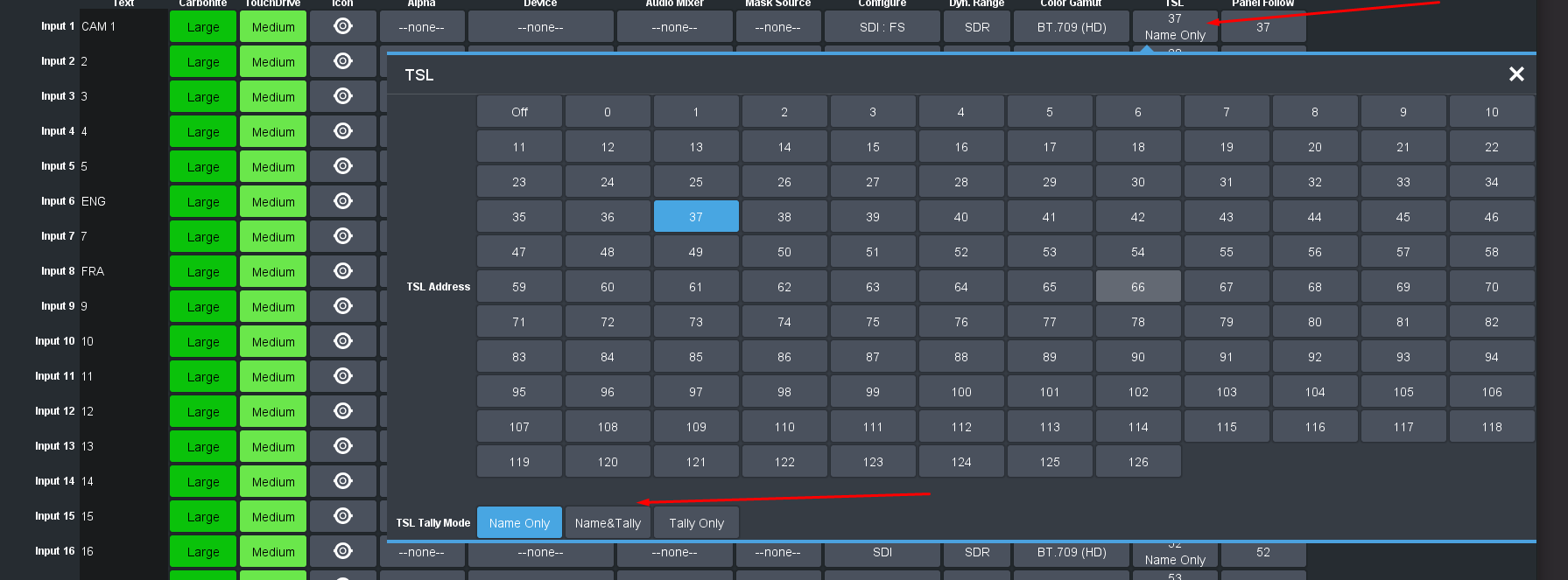
In the Input configuration you setup you TSL UMD ID to track and then you setup if you are to get TALLY for that source from the switcher Tally Management or from the external TSL controller management.
------------------------------
Les O'Reilly
Director - Switcher Product Management
------------------------------
Original Message:
Sent: 07-25-2022 10:24
From: Silvio Bacchetta
Subject: Ultrix Carbonite TSL/UMD labels from Ultrix
Hi, thank you, still not optimal but I could use it (I have an existing integration feeding city names from a database to Tallyman).
Any idea on how to read tally status from tallyman? All I can see on the Carbonite is the TSL Serial Tally driver installed: apparently it is what's receiveng names (port 5727) but no way to read tally status from it.
Cheers.
------------------------------
Silvio Bacchetta
Production Application Specialist
SKY ITALIA
Original Message:
Sent: 07-25-2022 10:12
From: Les O'Reilly
Subject: Ultrix Carbonite TSL/UMD labels from Ultrix
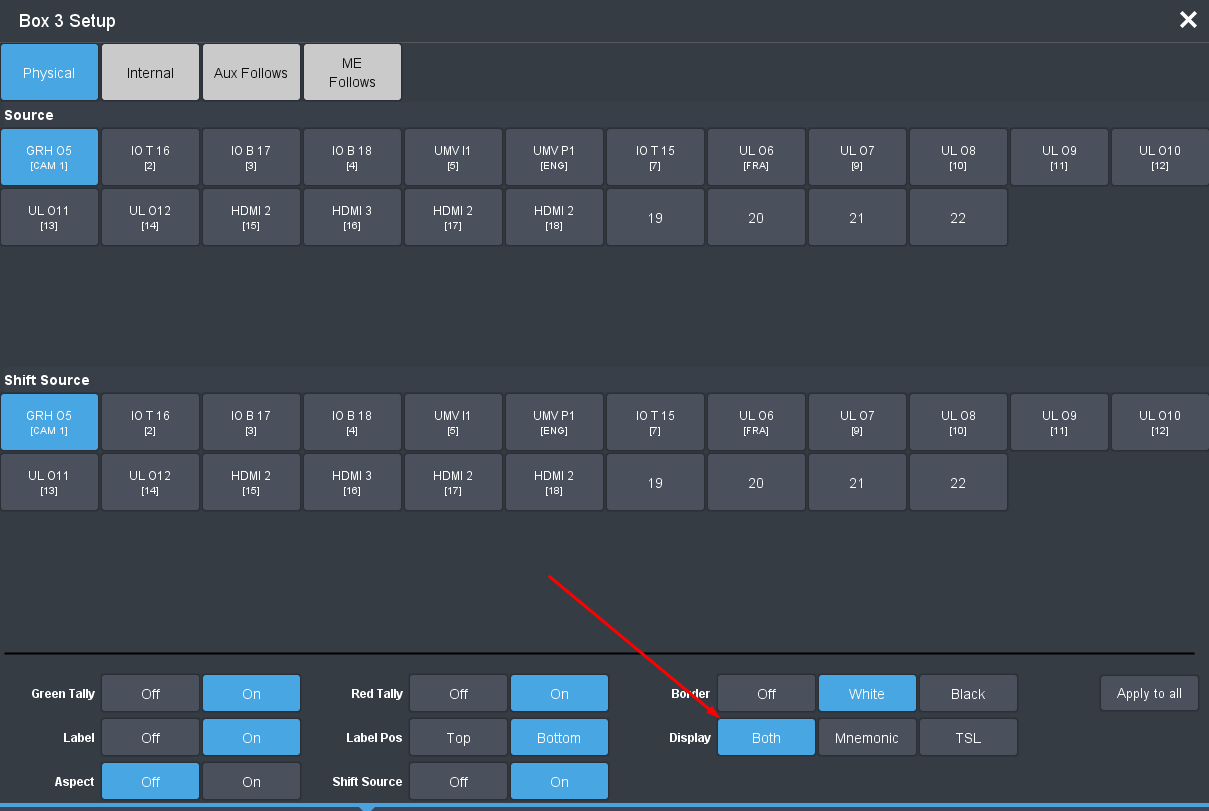
The Switcher MV UMD can be setup to accept TSL and also show the Switcher User Name.. Say Input 1 is CAM 5 in the Carbonite Input Name and the TSL Name Coming in is LONDON then in the Carbonite MV Settings you can enable Per Box the Label "Display" Option to have Both / Mnemonic / TSL and with Both you would see "CAM 5:LONDON".
In this example my Input 1 is named CAM 1 and the TSL coming from my Ultrix to the Ultrix Carbonite is GRH 05 ...
So my Label would be "CAM 1:GRH 05"
------------------------------
Les O'Reilly
Director - Switcher Product Management
Original Message:
Sent: 07-22-2022 10:04
From: Silvio Bacchetta
Subject: Ultrix Carbonite TSL/UMD labels from Ultrix
Hello! Actually both. I will post a few screenshots next week (I can't access dashboard remotely), but the basic idea is two have a PIP with two UMDs (a city and an event name) both coming, if possibile, from Tallyman. So far, one of them is static -- acceptable solution if not ideal.
Do you have any suggestion about the second point?
Cheers.
------------------------------
Silvio Bacchetta
Production Application Specialist
SKY ITALIA
Original Message:
Sent: 07-21-2022 14:28
From: Les O'Reilly
Subject: Ultrix Carbonite TSL/UMD labels from Ultrix
Hi Silvio -- are you referring to the "internal" carbonite MV or the Ultrix MVs?
could you post some screen shots of the item configuration you have and then maybe a picture with an explanation of what you would like to be seeing instead in the MV display?
------------------------------
Les O'Reilly
Director - Switcher Product Management
Original Message:
Sent: 07-21-2022 10:12
From: Silvio Bacchetta
Subject: Ultrix Carbonite TSL/UMD labels from Ultrix
Hello, I'm setting up an Ultrix Carbonite. Multiviewer's UMD is working fine, but I could use some help:
- is it possibile to assign to one PIP more than one UMD, each with a separate address? So far, every PIP get the same label as the PIP;
- what is the correct configuration to read the Carbonite tally status? I have tried to add a serial tally slot (Carbonite) and also an outgoing connection on the Ultrix, ma Tallyman says connection is down (but I can read Ultrix status as a router).
Do you have specific instruction for this? I have tried with the legacy Carbonite guide I found here but this one seems different.
------------------------------
Silvio Bacchetta
Production Application Specialist
SKY ITALIA
Original Message:
Sent: 06-27-2022 14:40
From: Les O'Reilly
Subject: Ultrix Carbonite TSL/UMD labels from Ultrix
Not a specific one .. but does seem like something needs to go in there .. since I have a graphite / Ultra and ultrix Carbonite all talking to the ultrix I just chose those names for me...
------------------------------
Les O'Reilly
Director - Switcher Product Management
Original Message:
Sent: 06-27-2022 14:18
From: Jason Kaplan
Subject: Ultrix Carbonite TSL/UMD labels from Ultrix
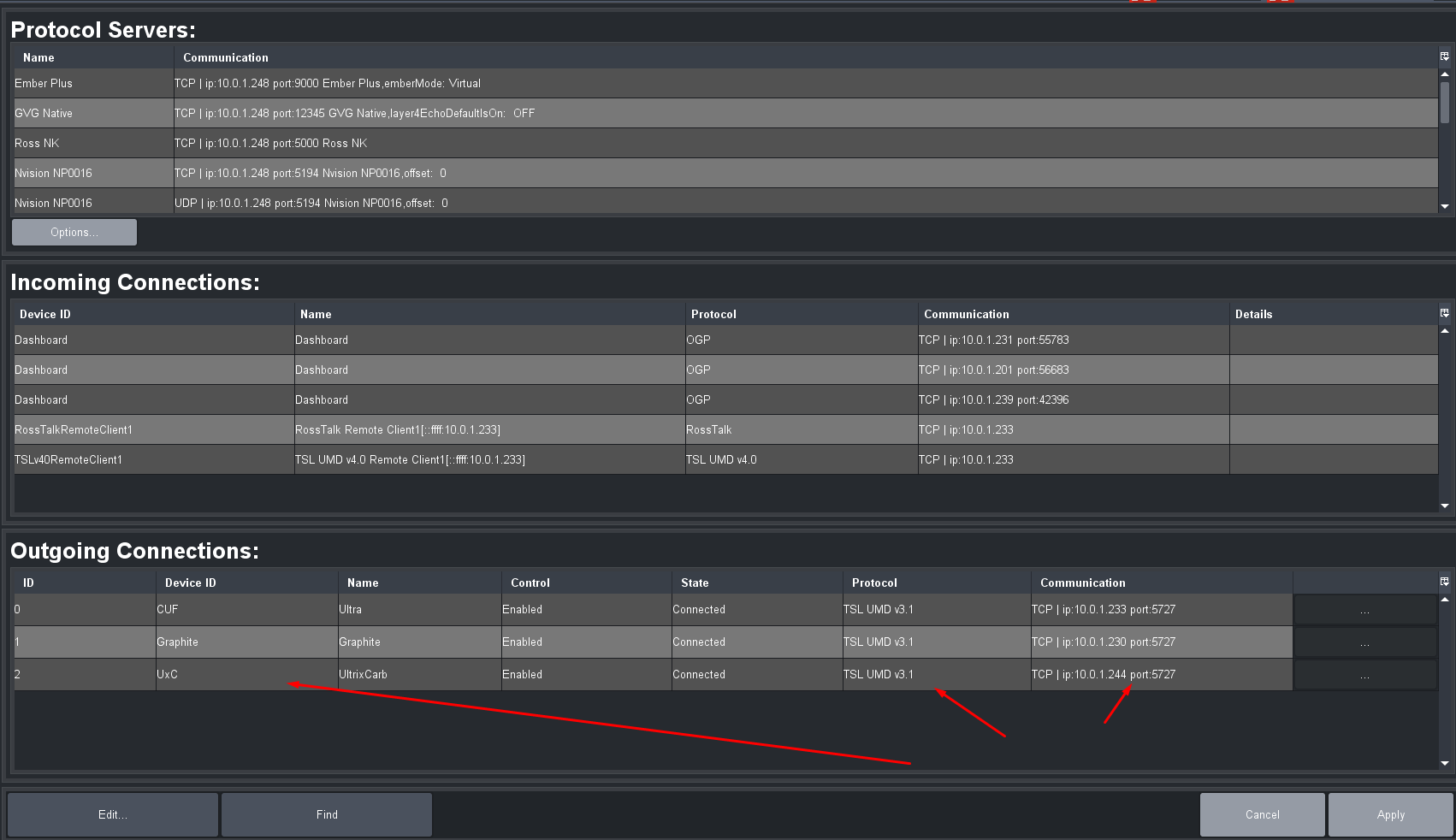
Thanks! It works now. I had setup the outgoing connection correctly (I thought), but when I reconfigured it I used the Device ID that you input (UxC) and it worked. Is that Device ID (UxC) required to make it function correctly?
Thanks again!
------------------------------
Jason Kaplan
Video Streaming Engineer
PTC
Original Message:
Sent: 06-27-2022 13:46
From: Les O'Reilly
Subject: Ultrix Carbonite TSL/UMD labels from Ultrix
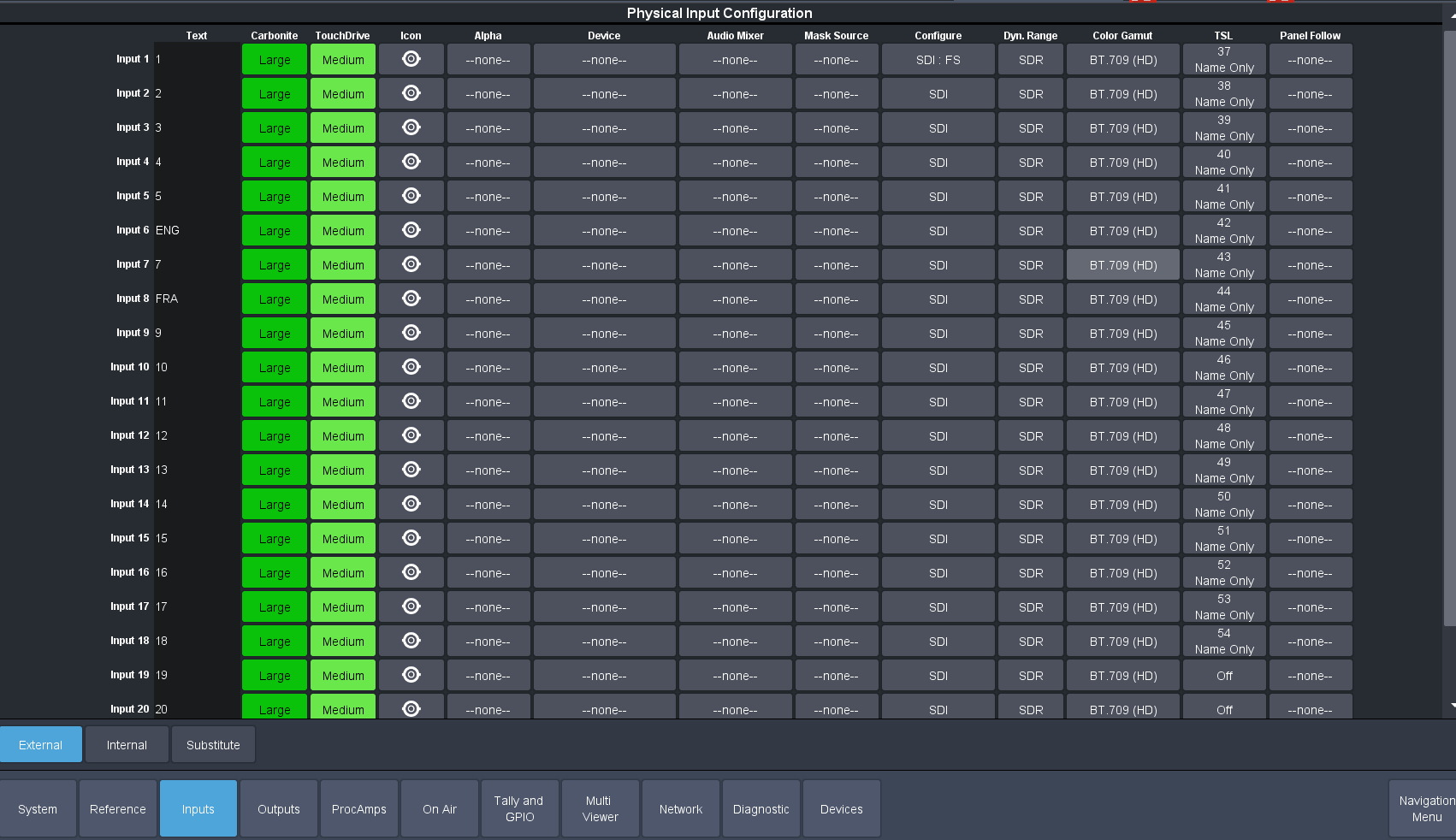
You need to setup a device in Dashboard for the Ultrix to send to the Carbonite as well.. The Carbonite is always running the TSL Input server as 5257 tcp..
------------------------------
Les O'Reilly
Director - Switcher Product Management