Original Message:
Sent: 01-12-2026 08:10
From: Bernhard Aschenwald
Subject: Vector in visual logic
Thanks a lot. I was just wondering, why there is no such block in VL. Please mark it a s a feature request.
------------------------------
Bernhard Aschenwald
Servus TV
Red Bull Media House
Austria
------------------------------
Original Message:
Sent: 01-12-2026 07:47
From: Simon Redmile
Subject: Vector in visual logic
I'll ask dev team if there's a way to do this is VL but for you now I wrote you a script.
Put this in the scene onOnline and onPreview Render
Dim cube As xpCubeObject
Dim txt As xpTextObject
Dim scalex As String
Dim scaley As String
Dim scalez As String
Dim p1 As Integer
Dim p2 As Integer
Dim src As String
self.GetObjectByName("Cube1", cube)
self.GetObjectByName("ScaleXYZ", txt)
src = txt.Text
' Find comma positions
p1 = InStr(1, src, ",")
p2 = InStr(p1 + 1, src, ",")
' Extract scale values
scalex = Left(src, p1 - 1)
scaley = Mid(src, p1 + 1, p2 - p1 - 1)
scalez = Mid(src, p2 + 1)
' Apply scale
cube.ScaleX = scalex
cube.ScaleY = scaley
cube.ScaleZ = scalez
------------------------------
Simon Redmile
Senior Graphic Programmer & Designer
Ross Video
Bristol United Kingdom
Original Message:
Sent: 01-12-2026 07:05
From: Simon Redmile
Subject: Vector in visual logic
Oh I see! so you want to feed a vector into a Quad, like a delimited string rather than 3 separate values.
I've only ever done this via script I think. I am actually looking for a vector out block but I only see vector in blocks that send values out, I'll keep looking!
------------------------------
Simon Redmile
Senior Graphic Programmer & Designer
Ross Video
Bristol United Kingdom
Original Message:
Sent: 01-12-2026 06:40
From: Bernhard Aschenwald
Subject: Vector in visual logic
For Example: I have a input selector with different scales (vectors) and want to assign them to an object. Now i have to assign every axis separately. So I want to have custom vector blocks, where i can input 3 values (x,y, z). Just like math value or the string value block.
------------------------------
Bernhard Aschenwald
Servus TV
Red Bull Media House
Austria
Original Message:
Sent: 01-12-2026 06:17
From: Simon Redmile
Subject: Vector in visual logic
Do you mean like a vector shape?
If so you'll need to script an api texture, I don't think its included in Visual Logic.
------------------------------
Simon Redmile
Senior Graphic Programmer & Designer
Ross Video
Bristol United Kingdom
Original Message:
Sent: 01-12-2026 06:13
From: Bernhard Aschenwald
Subject: Vector in visual logic
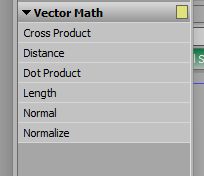
But how can i create a new vector using custom values?
------------------------------
Bernhard Aschenwald
Servus TV
Red Bull Media House
Austria
Original Message:
Sent: 01-12-2026 06:02
From: Simon Redmile
Subject: Vector in visual logic
------------------------------
Simon Redmile
Senior Graphic Programmer & Designer
Ross Video
Bristol United Kingdom