have you tested by putting in a data you know is the the data rather than the macro?
Original Message:
Sent: 09-12-2023 13:51
From: Chad Loury
Subject: Visual Logic and Datalinq
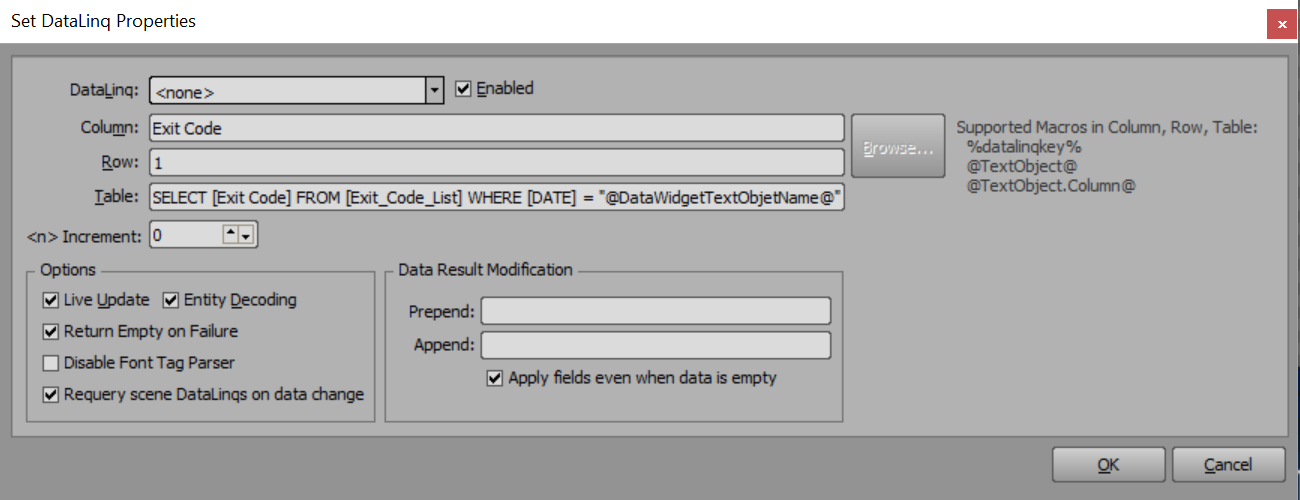
So i seem to still be strugggling. sorry. thank you for the help. here is my query in the table line:
SELECT [Code] FROM [Exit_Code_List] WHERE [Date] = "@DATEHERE@"
in the spreadsheet the columns are"Code"and"Date"
currently i have the DATEHERE text object visible in the scene for reference the date is showing correctly. It shows 9/11/2023 and the sheet has a date of 9/11/2023 but the code for that date is not reflecting.
------------------------------
Chad Loury
AZUSA PACIFIC UNIVERSITY
------------------------------
Original Message:
Sent: 09-11-2023 14:26
From: Simon Redmile
Subject: Visual Logic and Datalinq
You don't need visual logic, you can just do what you need directly on the text object under the data tab and just click datalinq.
You probably need quotes like in my example around @textobject@ because date will be a string not an integer.
------------------------------
Simon Redmile
Senior Graphic Programmer & Designer
Ross Video
Bristol United Kingdom
Original Message:
Sent: 09-11-2023 13:53
From: Chad Loury
Subject: Visual Logic and Datalinq
Thank you, this is what i was looking for. yet im still struggling with my outcome. Here is my querey and yet not sure what i have wrong.
------------------------------
Chad Loury
AZUSA PACIFIC UNIVERSITY
Original Message:
Sent: 09-11-2023 04:54
From: Simon Redmile
Subject: Visual Logic and Datalinq
Make a text object for the date and then connect that to a date widget.
When you connect to datalink just use a query for the connection that looks at that text object.
------------------------------
Simon Redmile
Senior Graphic Programmer & Designer
Ross Video
Bristol United Kingdom