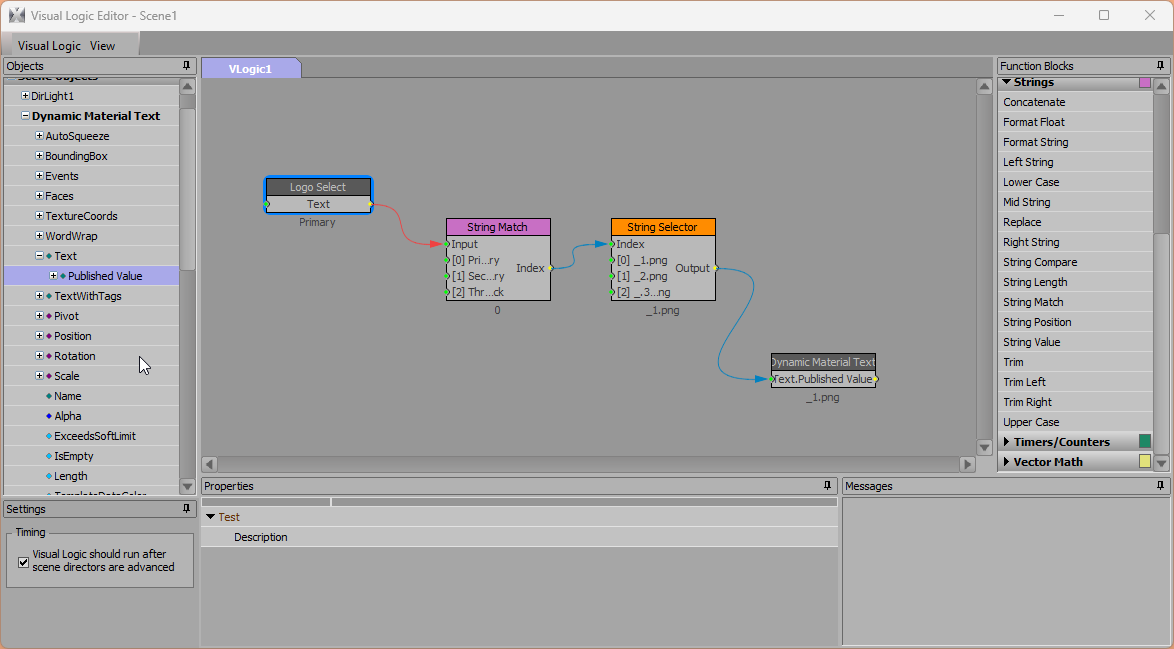
The Published Value was added to makes data from Visual Logic available earlier in the template workflow for dynamic material paths other features like @Text Object@ macros.
Original Message:
Sent: 08-11-2026 03:40
From: GAURAV SODHANI
Subject: VL + Dynamic Material
Hey Jeff, thank you for your response. The script did the trick and the scene is working flawlessly.
I tried the 1st option but that yeilded no result i.e the dynamic material didnot set when the graphic was taken online on sequencer. Then i added the single line script and it worked.
'Published Value' of text object in VL is something new that i have become aware of now. What is the use case scenario for this? I read that u wrote '...send the result of the VL into the Text.Published Value property. This will put the result of your visual logic into template data earlier than it would the text of the object...' so why not have one property of the text object rather then 2? This is just for my knowledge so as to understand the basic principal behind having 2 properties of the same object in VL.
Thanks once again for your help and recco.
Gaurav
------------------------------
Gaurav
------------------------------
Original Message:
Sent: 08-07-2026 09:02
From: Jeff Mayer
Subject: VL + Dynamic Material
Gaurav,
Two things you can try.
1. If you're running XPression 11.0 or higher, instead of using VL to feed into the Text property of your TEST text object, send the result of the VL into the Text.Published Value property. This will put the result of your visual logic into template data earlier than it would the text of the object, allowing that text to be used in other functions of the scene like Dynamic Material paths.
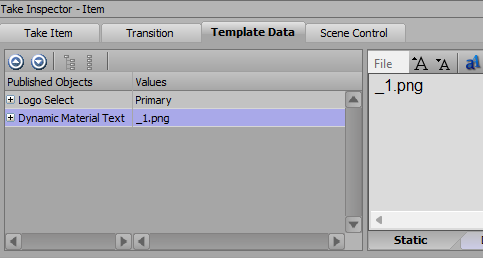
This will also make the resulting text from your visual logic available in the Take Inspector in Sequencer, which may or may not be preferable in different circusmstances.
2. Alternatively, you can add a simple script to the onOnline and onPreviewRender events of your scene to rerun the Dynamic Materials after the visual logic runs
self.RefreshDynamicMaterials
Depending on what type of manipulation you're doing to your text, there may be ways to use a combination of User Input Controls and Assign Columns to get this done outside of VL as well, which would take care of the order-of-operation issues itself.
------------------------------
Jeff Mayer
Ross Video
------------------------------
Original Message:
Sent: 08-06-2026 10:38
From: Simon Redmile
Subject: VL + Dynamic Material
its probably an order of operation issue then, did you say you are making the path in Visual logic?
VL is probably making the path after it has checked the dynamic path
1.OnPrepare
2.Collect Datalinqs / Load Video Clips / Load Textures etc..
3.OnBeforeOnline
4. Evaluate transition logic (which may include running OnTransLogicScripts)
5.OnOnline
6. Visual Logic Runs
------------------------------
Simon Redmile
Senior Graphic Programmer & Designer
Ross Video
Bristol United Kingdom
------------------------------
Original Message:
Sent: 08-06-2026 10:05
From: GAURAV SODHANI
Subject: VL + Dynamic Material
Red, i am not using DATALINQ on the text object.
For example:
My dynamic material path for the quad is \Images\@LOGO@@TEST@.png. LOGO is thru datalinq but the TEST is the text object which is being manupulated inside VL to give the dynamic material correct logo image to be choosen from the drive.
------------------------------
Gaurav
------------------------------
Original Message:
Sent: 08-06-2026 09:34
From: Simon Redmile
Subject: VL + Dynamic Material
Tick this on the textbox datalinq connection.

------------------------------
Simon Redmile
Senior Graphic Programmer & Designer
Ross Video
Bristol United Kingdom
------------------------------