No they are just the defaults and I hadn't changed them to get this result.
Btw with the video mask you can just right click, add mask > video and if the video has alpha channel it will work as a mask.
Just be sure the original video has an alpha channel and when you use whatever encoder, either XPression Video Coder or your own choice you encode (RGB+A) as you rightly mentioned above.
------------------------------
Simon Redmile
Senior Graphic Programmer & Designer
Ross Video
Bristol United Kingdom
------------------------------
Original Message:
Sent: 09-01-2022 19:07
From: Aleksander Stalsberg
Subject: XPression and Masks - I would like an answer from a ROSS Employee
Ok, I got to the same conclusions and results, just a tad different way about it appereantly.
But thank you Red.
Second, I got to ask you now, I see you have also checked the two options for "No Depthwrites" and "Ignore Object Alpha".
Any reason for that in this case? Or any reason for it in particular?
------------------------------
Aleksander Stalsberg
Inland Norway University of Applied Sciences/Lillehammer Icehockey Club
Norway
Original Message:
Sent: 09-01-2022 18:47
From: Simon Redmile
Subject: XPression and Masks - I would like an answer from a ROSS Employee
1. Yes, add an image or video mask and then change the alpha current stage to invert.
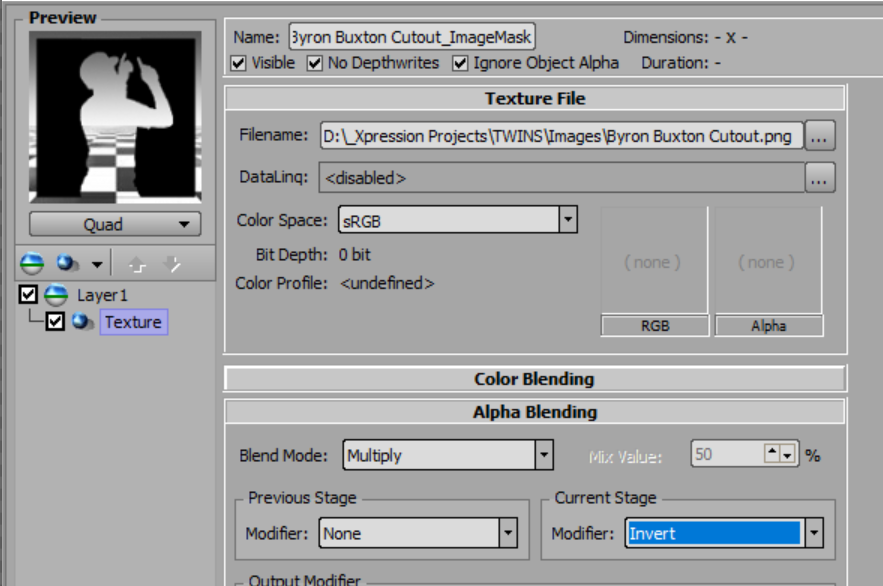
2. Yes add another layer with that image.
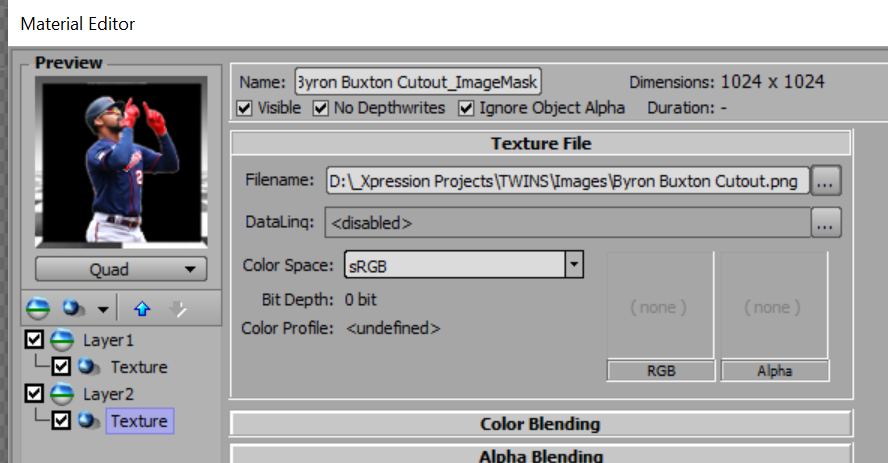
Exactly the same can be done with videos.
------------------------------
Simon Redmile
Senior Graphic Programmer & Designer
Ross Video
Bristol United Kingdom
Original Message:
Sent: 09-01-2022 18:30
From: Aleksander Stalsberg
Subject: XPression and Masks - I would like an answer from a ROSS Employee
Masks.... I'm really getting somewhat fed up with this, and just about to give up... As no one ever seems to be able to give anything other than a cryptic message and a response that makes next to no sense.
So here, question by question.... And I will also add answers to it as I go on testing and confirming or not getting anywhere...
- Is there a way to invert add your own black & white picture as a mask? Like from a .png silhuette...
Say I have a material with a video input. Then I have the outline of our logo.
I want to create a hole in the video material with the logo outline.
- Is this even possible?
Answer: Yes, possible. Create a .png picture with alpha channel. Put both layers inside a LayerObject, with the logo above the background material. Then set the logo material -> Layer 1 -> Blending Mode -> Alpha mask - Should the outline logo be black or white?
Answer: Does not appear to matter at all... All that matters seems to be the alpha mask of the texture. Though it seems you cant set this without changin the original .png that came with the alpha channel to begin with.
- Is there a way to invert said mask. Well, if the above on question 1 is possible.
Is it possible to invert the mask, so that I no longer have a hole in the material below, but rather keep whatever is inside that mask/material???
Answer: Appereantly so, after some testing... With the result from above, where you cut out a hole in the shape of a logo, you can choose to keep the logo with the following settings...- Go to the material created with a mask.
- Go to the "Texture" shader of the layer containing the mask.
- Find the "Alpha Blending" section, set Blend Mode to Subtract and Mix Value to 100%.
- This will now invert the mask and keep the logo showing, but removing the frame around it.
- If either one above is possible... Can the same be done with video files? In other words, create an .avi with black (or maybe white???) video that can then function as a mask?
And if so, can this one be inverted?
I'm sorry if you feel this has been answered elsewhere, but I feel I really havent found a good answer to any of these questions at all...
------------------------------
Aleksander Stalsberg
Inland Norway University of Applied Sciences/Lillehammer Icehockey Club
Norway
------------------------------