I found out that some of my coworkers do use Xpression INcoder and the watch folder upload method. I've always used the Record Client method.
We're currently discussing how we'd like to add Recall IDs to our file naming convention, but it definitely seems like we'll start using this method soon. Thank you very much for informing me about it!
Original Message:
Sent: 02-08-2023 17:35
From: Garner
Subject: Xpression Clipstore Replace File
Yes, the behavior of the recall ID overwrite workflow is configured in the Clip Store Manager.
How do you add clips to the Clip Browser? Using the Record Client? In the Send To Clip Store interface for Record Client, there is a field in metadata where you can input a recall ID.
XPression INcoder is an autonomous watch folder transcoding and filling system for XPression. It monitors watch folders and picks up video/images in them. It then transcodes them and assigned recall IDs to them based on different parameters:
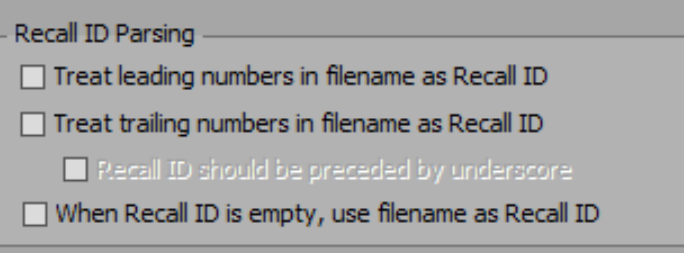
So your workflow should be dropping clips into watch folders and then either by name or number having new clips with matching recall IDs overwriting old clips automatically.
I remember setting up the INcoder system at Sysmex with the Keycode Media team back in 2018 or 2019. If you aren't using the INcoder and recall ID workflow we should get on a session with you and review how to improve your XPression workflow.
Original Message:
Sent: 02-08-2023 17:15
From: Nick
Subject: Xpression Clipstore Replace File
Hi Garner,
For the overwrite recall ID workflow, is that configured in Clip Store Manager? I see an option in there under Recall ID Options / On Duplicate Recall ID: delete existing clip and subclips.
We don't currently use recall IDs in our clip browser, but that's easy enough for us to assign.
I'm not familiar with INcoder.
------------------------------
[Nick] [Kubinski]
[Studio Production Specialist]
[Sysmex America Inc.]
[Vernon Hills] [USA]
Original Message:
Sent: 02-08-2023 16:37
From: Garner
Subject: Xpression Clipstore Replace File
You defiantly should not be doing this manually ;)
Clips dragged directly from the Clip Browser into the Sequencer are automatically referenced by their recall ID (if they have one) and clips played from Seq or directly from Clip Browser to Server channels will use recall IDs. If you use the overwrite recall ID workflow then items in the Sequencer will automatically be updated to use the new clip without needed to be manually updated at all.
The overwrite recall ID workflow can be configured to delete matching recall IDs, or just replace the existing one and remove the recall ID from the old one.
In your Clip Browser, do your clips have Recall IDs assigned? Or are they blank?
If you have recall IDs, are they names or numbers?
Looking at the asset list on your Ross account, you have the XPression INcoder. Are you familiar with the ways that INcoder can parse or auto assign recall IDs to ingested clips?
Original Message:
Sent: 02-08-2023 16:14
From: Nick
Subject: Xpression Clipstore Replace File
Hi Drew,
Unfortunately we don't use any of our videos as dynamic materials or attach them to quads. We import them from Clip Browser straight into the Sequencer and cue them to Server Channels. I guess we'll have to keep doing it the manual way. Thanks!
------------------------------
[Nick] [Kubinski]
[Studio Production Specialist]
[Sysmex America Inc.]
[Vernon Hills] [USA]
Original Message:
Sent: 02-08-2023 14:02
From: Drew
Subject: Xpression Clipstore Replace File
The best way to go about this is by using the same RecallID for the Clip. If your new clip uses the same RecallID as the old, it will automatically replace it when linking to the clip either by Dynamic Materials or if you hold CTRL when dragging the clip from your clipstore to a quad.
------------------------------
Drew Shealy
XPression Designer & Programmer
SoFi Stadium