i great button to Triger ID foe Xpression ( TAKE , SEQO ) when the operator hit the buttons the Scene go online and the button turn red and online and when hit again the scene go offline and the button turn green and show offline
My Question is :
Can i do the reverse action Which means when the operator from Xpression play the scene id online send to dashboard so if the button green get red
( means can i make the dashboard listen to Xpression ?


Hey Tamer - This should be fairly straightforward to setup. The simplest way to do this is to have XPN send a GPI back to Dashboard. A few things to do to make this work…
1a- In Dashboard: “Window>Preferences>Rosstalk GPI Listener” - Enable and set to a port not being used. I like 7790 since it’s not the default.
1b- Build a Dashboard button that does what you want, and then double click to edit that button. In the “Trigger ID” field, make up a custom GPI name, aka “RED”.
2- In Xpression: Configure your scene to send a Rosstalk “GPI RED” command to the ip address and port (7790) of your Dashboard computer. You can do this as an “OnOnline” script or as a Rosstalk item on your default Scene Director.
Hopefully that points you in the right direction. Does that make sense?
Hi Bo Cordle,
Many thanks this will be fantastic when done just need little more help from you
How i can write it in the RossTalk trigger ?
could you plz send me the “OnOnline” script
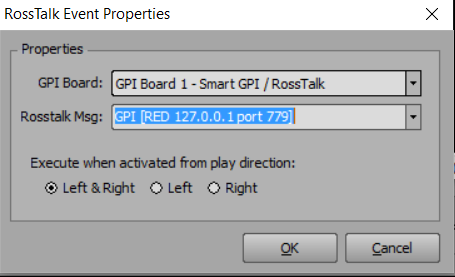
First you’ll need to setup your outgoing IP & Port in GPI board in “Edit>Hardware Setup…>GPI/Tally Boards”…
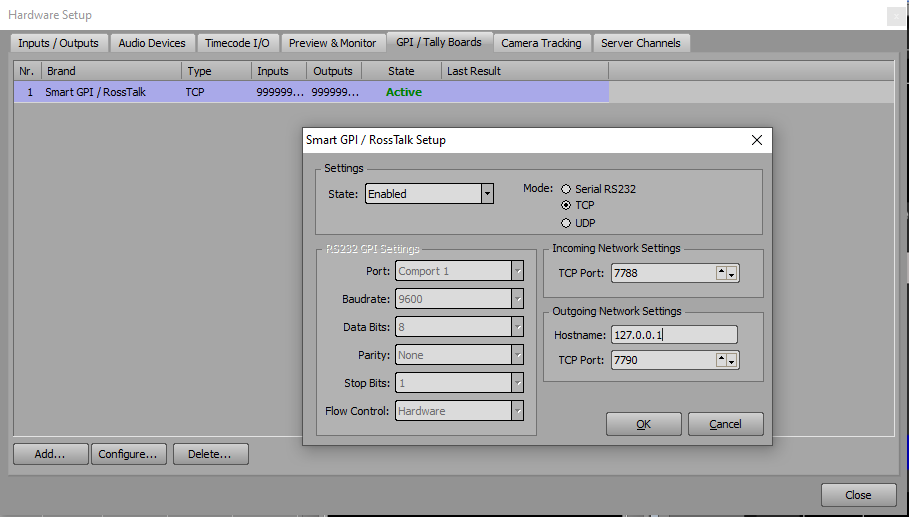
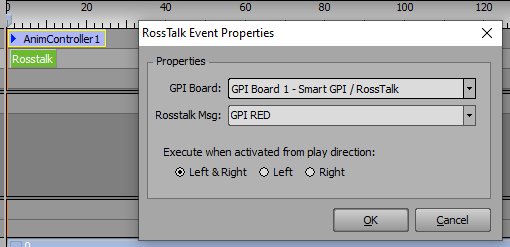
Then, within your scene director Rosstalk trigger, it would simply look like this…
Thanks Bo Codle,
its work.
But the behavior is not that i want cuz the trigger just read the button status
if i hit online in Xpression and the the button in dashboard is offline the scene will not go online and the opposite
i just want if i hit online in Xpression make the status of button in dashboard online and if i hit offline make the status of button in dashboard offline
don’t know if that possible or no
Thanks for your help
Take a look at this panel and see if it helps. Copy the code below into a new custom panel…
/! block id=1000 !/
ogscript.setStyle(“TriggersXpression”, “bg#red”);
/!!
!!/
/!!2b575a14c842a15a867195bd1d2fa6a4!!/
/! block id=1001 !/
ogscript.setStyle(“TriggersXpression”, “bg#green”);
/!!
!!/
/!!d3bf0bc6332ff868596bbf9bffa610b8!!/
Hi dear,
Thanks for your help
if you can see the video in the link this is exactly what i want to do
https://drive.google.com/file/d/1nsCW4p4CA-4dlFx8nkn4nUL6smd0_qYU/view?usp=sharing
Thanks