HELP!
Why can’t I get this to work. Frustrated here - And I believe I have done this before with VL. Have spent too much time already.
I will have a graphic that can range anywhere from 1 to 8 lines of info. Most likely not just 1 or 2 lines, but you never know.
I need to make these lines of text center vertically whether its 1 line of text, 3 lines of text or all 8 lines.
This example shows all 8 lines. I like how the spacing looks so I would need the 8 lines to center within Line 1 and Line 8.
Ideally, if I had 4 lines of test it would look like just lines 3 thru 6.
TIA for your help.
how-to-do-logic-without-scripting
Give this tutorial a look see. I think it will get you going in the right direction.
Thanks Mal -
I’ve seen this video before and actually reviewed it yesterday prior to sending out this message.
I just can’t figure it out.
Like I said, the producers will have the choice of up to 8 lines of text. I need them to center vertically according to the number of lines.
Any help would be appreciated.
Thanks,
Anthony Bordignon
XPression Graphics Designer | Stadium
1901 W. Madison St.Chicago, IL 60612M: 630.890.2287watchstadium.com I Welcome to the game – sign up now for updates
You could have a text field that selects the number of lines, then use logic blocks in visual logic that “if rows = 2” then you could turn off the visibility of all the others after two, and also do Y positions for each of the text lines. I’ll see if I can get something laid out. I’m pretty sure Simon Redmile will have something up before I get to it.
Thanks!
Anthony Bordignon
XPression Graphics Designer | Stadium
1901 W. Madison St.Chicago, IL 60612M: 630.890.2287watchstadium.com I Welcome to the game – sign up now for updates
Here is a quick build in visual logic if the number of rows is 3. If you duplicate this for each number of rows, you can then adjust the vertical space. You would also want to have it set the visibility to true (1) for each text object, otherwise set it to false (0) Just build a new visual logic tab. This is pretty simple and SHOULD work. I haven’t tested it on all values.
Hello and Thanks again -
I have spent the afternoon trying to implement what you sent.
In the end, it allows me to set a fixed Y position for the row.
But I am trying to have it distributed evenly depending on the number of rows.
Am I missing something?
Anthony Bordignon
XPression Graphics Designer | Stadium
1901 W. Madison St.Chicago, IL 60612M: 630.890.2287watchstadium.com I Welcome to the game – sign up now for updates
If you make another tab where the logic argument is 2, then you can custom position those two lines. And so on and so on. So rather than automatically distributing them, you are basically giving them preset vertical positions. It “gets the job done” but its pretty limited.
Here’s an example where Visual Logic’s upper part aligns the lines and the lower part hides the extra lines.
This works if you first make the scene according to the example, all 8 lines in the right places as sub-objects of each other.
Br. Juha
or you can do the following;
set your text objects like this, only the one in the group is visible. \
Link the various lines to one text box like this;
The delimiter is \n this will force a return.
Connect the bounding box height to the position Y divided by 2 to get half of it’s height.
Use the group position you put the last text box in to put the text where you want it.
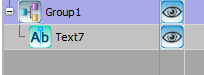
Unpublish the visible box and keep the nonvisible ones visible.
Done.
Thanks Red and Juha -
I will give these a try and let you know.
Thank you both so much.
ASB
Hi ABS
Can you try this script?
    Dim positionY As Double = 512
    Dim txt(7) As xpTextObject
    Dim group As xpBaseObject
    self.GetObjectByName("Group1", group)
    For i As Integer = 0 To 7
        self.GetObjectByName("Text" + CStr(i + 1), txt(i))
    Next
    Dim n As Integer = 0
    Do Until txt(n).Text = ""
        n = n + 1
        If n > 7 Then
            Exit Do
        End If
    Loop
    group.PosY = positionY - txt(n - 1).PosY / 2
Paste it in Online and in OnPreviewRender. And all text objects should be placed in a group.
Hi All -
I was pulled away from this for a while, but back at it today.
I’ll keep you all posted.
Anthony Bordignon
XPression Graphics Designer | Stadium
1901 W. Madison St.Chicago, IL 60612M: 630.890.2287watchstadium.com I Welcome to the game – sign up now for updates
Side question -
Using Xpression Designer and I can access and create in VL, but its not taking doing any of the functions…
Example Value 4 Value 6 and ADD - all 0
I restarted multiple times.
Using a different laptop today.
Setting I am missing?
Please assist
Anthony Bordignon
XPression Graphics Designer | Stadium
1901 W. Madison St.Chicago, IL 60612M: 630.890.2287watchstadium.com I Welcome to the game – sign up now for updates
Is the little blue diamond active at the top of your viewpoint?
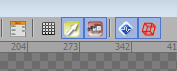
Good call…
Using a different laptop and didn’t even realize that was not checked.
I knew it had to be something simple.
Anthony Bordignon
XPression Graphics Designer | Stadium
1901 W. Madison St.Chicago, IL 60612M: 630.890.2287watchstadium.com I Welcome to the game – sign up now for updates


