Thanks, Jeff! This helps tremendously.
I also found that you have a video on this subject in XpressionU:
Configuration of the XPression MOS Abstract - Ross Video
------------------------------
Bill Schocke
------------------------------
Original Message:
Sent: 11-13-2024 08:21
From: Jeff Mayer
Subject: Add "Channel" and "Description" metadata to Xpression element names
Bill,
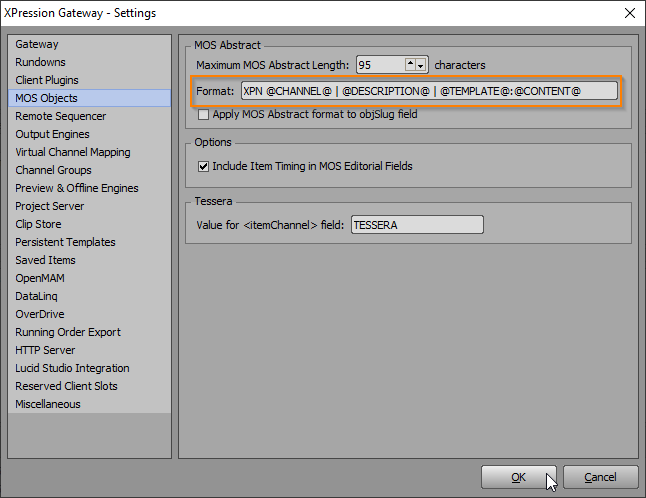
On the XPression Gateway, there's a MOS Objects setting where you can define the format of the MOS Abstract. You can right click inside the Format box to see a list of all available fields to include. You can type your own hard-coded text in as well. In your your case, choose @CHANNEL@ and add the "XPN " yourself instead of using @VCNAME@ so you don't get the entire description of the channel in your MOS string.
Once you make the change on the gateway, relaunch your plugin and all new MOS items will use this format for the MOS abstract.
------------------------------
Jeff Mayer
Ross Video
Original Message:
Sent: 11-12-2024 12:43
From: Bill Schocke
Subject: Add "Channel" and "Description" metadata to Xpression element names
Can someone share the information of how to set up our Xpression MOS to add the Farmebuffer channel name and the info in the "Description" field to the beginning of the file name that eventually gets added to the story in ENPS.
------------------------------
Bill Schocke
------------------------------