Thanks Jack, much appreciated!
And yes, even us non-admins (super users) can change the columns, that's cool!
But it wasn't where I was looking to add them.
The idea being, in a calendar-based view, to be able to see who created an item when within the assignment itself - presumably in either some item in the assignment's toolbar or in the pop-up one gets when one clicks to edit the assignment settings.
But adding/changing columns in the default AM view doesn't add those to the fields in that assignment settings pop-up or somewhere viewable in the assignment itself, right?
(Can I ask you more questions, please? Such as -- I'm a bit confused about when the notification sound is off/on, the icon, sound and pop-up tooltip have me a bit confused - the icon shows sound when you point and it pops up 'turn notification alarm on' or somesuch and vice versa! We used to use Slack, are now using Teams with its Chat so not sure how much we will use messaging/chats/discussions/conversations but it's surely a nice option. In fact, with a new news director coming aboard we are really kicking tires of both Ross and Teams for story generating ideas and trying to decide on a path - which may well involve both, each for what they are good for. There is no 'blank sheet of paper' story idea list option in Ross like a share Word .doc. My thought is, start in Teams for digital version of newsroom brainstorming and then when a story is fully formed, THEN put it in Ross Assignment Manager. Also trying to decide how to best organize folders - by reporter, etc. etc.)
Katie Zuniga one of our trained super-users is trying to hook me up with 1-2 of the folks she met/trained with with Ross, I mean I can pop notes here - at least then these forums are getting used! I know some Ross communities are pretty active, but the newsroom-related ones are sort of.. not;-)
Thanks again!
------------------------------
Barney Lerten
Digital Content Director
KTVZ NewsChannel 21 (NPG of Oregon)
------------------------------
Original Message:
Sent: 10-16-2022 06:37
From: Jack Horry
Subject: Can one move assignments/pitches between folders?
Hey Barney,
Glad you found the moving content part of the docs, If you cant see fields in the assignment view right click (two finger press on the touchpad does the same thing on a laptop trackpad) on the grey bar with the field names in them. A menu with ticks should appear. I think in this case (photo bellow) Created and Created By are the fields your looking for. SuperUsers can influence what appears in this menu so if you cant see what your looking for, asking a superuser is the place to start.
Newly added fields appear on the right hand side so you may need to scroll right to see them.. You can then drag the column left or right help you organise your view. I do recommend saving a perspective if you have all the columns saved the way you like it before you start so you can come back to it if required. 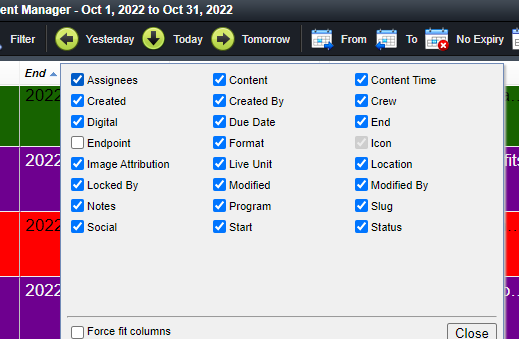 I hope that helps you get closer to what your looking for.
Jack
------------------------------
Jack Horry
Product Manager
DashBoard, PowerPlay, Lightning
Ross Video | Living Live
------------------------------
Original Message:
Sent: 10-15-2022 19:19
From: Barney Lerten
Subject: Can one move assignments/pitches between folders?
OK, for some reason I wasn't search right in docs, I now see 'moving content between folders,' I swear I tried and it wasn't working. Oh well, still interested in those other "missing" fields (who put the assignment/pitch IN the folder, and when) - if they turn up I'll feel dumb again, if it's a Super User customization we'll get there!
------------------------------
Barney Lerten
Digital Content Director
KTVZ NewsChannel 21 (NPG of Oregon)