I'm looking to solve a variation on this theme.
Is there a way to change the output Framebuffer programatically?
We have several XPression templates where we would like to output to a different Framebuffer based on the value of a user selected dropdown box.
It's easy enough to test the value of the dropdown, but we're unable to find the syntax that outputs the graphic to a Framebuffer different than than default Take Item Framebuffer.
In terms of on air execution, the graphic renders in two distinct styles
Keyable animation where the graphics flies on, then flies off with a Take Offline
A Pre-revealed graphic that is integrated into a switcher effect
The Directors are requesting the Pre-Reveal graphics be automatically generated to a different Framebuffer than the Key Reveal.
Does anyone have experience dynamically changing the output Framebuffer of a graphic?
------------------------------
Kurt Stoneburner
Broadcast Director
KGO-TV
------------------------------
Original Message:
Sent: 10-21-2023 08:20
From: Ragnar Santos
Subject: Changing Channels in Designer
Hi Sarah,
In Xpression Designer you can assign output channels. It´s on the Take Item tab. You can choose the FrameBuffer (Output Channel), FrameBuffer 1 = Output Channel 1, and FrameBuffer 2 = Output Channel 2.
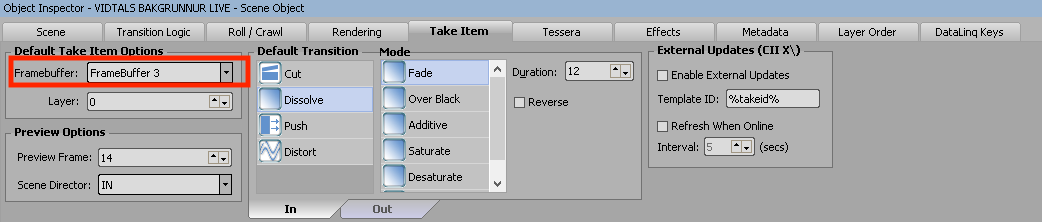
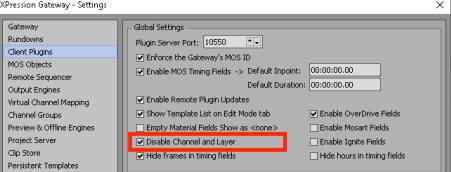
I would also disable the Channel and Layer in Xpression Gateway.
------------------------------
Ragnar Santos
Producer/Director
Icelandic National Broadcasting Service TV - RUV
Reykjavik Iceland
------------------------------