Hello Amy,
You should see them as soon as you build a new CCs in Caprica in Template Editor, unless you have a Central Server/Project Server workflow and you are building in a different control room. If you received training from a Ross trainer and you have their email, I would suggest contacting them to ask, if not, you may want to send a message to our Tech Support Team at support.rossvideo.com
------------------------------
Andreanne Tremblay
OverDrive Product Prime
Ross Video
Reading, United Kingdom
------------------------------
Original Message:
Sent: 05-10-2024 10:15
From: Amy Cawley
Subject: Clocks on OverDrive monitor
We were just upgraded to the most recent version of OverDrive last week, but I can't get down there right now to see the specific number. I built the CCs in Caprica/Dashboard, as we've done before.
We also started having trouble with our countdown clocks that are attached to the vid servers...but one thing at a time ;)
Thanks so much!
------------------------------
Amy Cawley
Operations Manager
WGHP-TV
------------------------------
Original Message:
Sent: 05-10-2024 09:58
From: Andreanne Tremblay
Subject: Clocks on OverDrive monitor
Could you tell me what version of OverDrive you use and did you build the Custom Control in Caprica or on a Vision or Acuity Switcher?
This will help me find the reason why you do not see the Custom Control in Template Editor.
Thank you!
------------------------------
Andreanne Tremblay
OverDrive Product Prime
Ross Video
Reading, United Kingdom
Original Message:
Sent: 05-10-2024 09:46
From: Amy Cawley
Subject: Clocks on OverDrive monitor
Thanks so much! That does seem to work, but the custom controls aren't showing up in OverDrive Template editor. I remember this may mean something needs restarted, but I can't remember what.
------------------------------
Amy Cawley
Operations Manager
WGHP-TV
Original Message:
Sent: 05-09-2024 06:29
From: Andreanne Tremblay
Subject: Clocks on OverDrive monitor
Hello Amy!
Yes you can do it by assigning a switcher event number to a "Timer Start" action. (Menu Window-> Preferences-> Switcher Events)
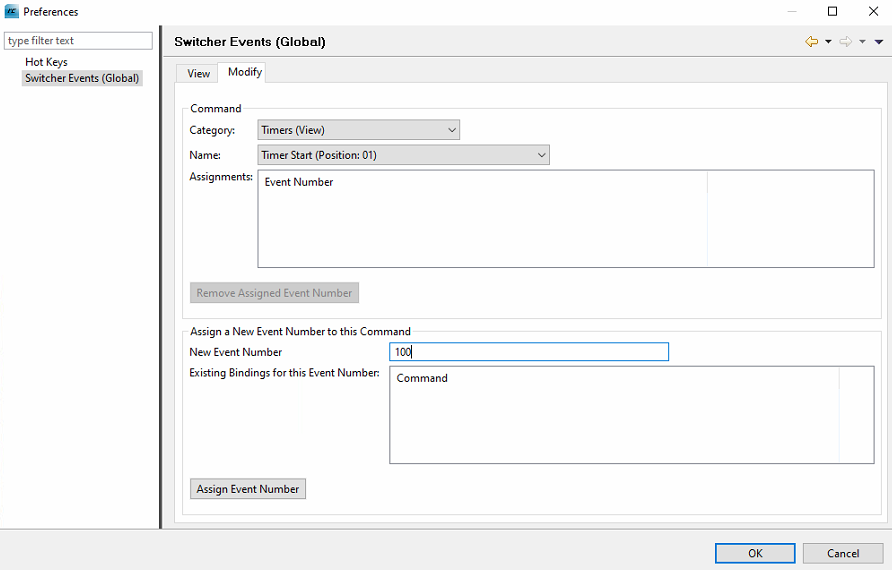
After this, in your Custom Control, you can add the event number in your custom.
- In Caprica it is in the "OverDrive" command category, "Run Switcher Event"
- In Acuity or Vision it is in the "Special" -> "OverDrive CMD" -> "Rundown"
Just put the same number in there and it should do the trick.
Let me know if this works for you! Have a great day!
------------------------------
Andreanne Tremblay
OverDrive Product Prime
Ross Video
Reading, United Kingdom