James, thanks so much for the guidance on this. I have it mostly working thanks to your code, but wanted to check on a couple things. I'm having to use a couple of free helper apps to get the MIDI notes from Dashboard to the mixer, and would like to avoid those.
(for future readers, Dashboard buttons correspond to MIDI notes, and Continuous Controllers show up as Control Changes in other MIDI applications)
How do I know that the default Dashboard MIDI controller is connected to a specified MIDI device? If I only have the default Dashboard MIDI control, it doesn't seem like Dashboard finds the AudioBox USB 96 MIDI interface. This is what I see in the Dashboard connection settings: com.rossvideo.midi:Real Time Sequencer:Oracle Corporation:Version 1.0
But just using that alone, it doesn't seem like MIDI commands go out from Dashboard to it.
I ended up having to download a program called LoopBe1 and create a virtual MIDI Dashboard controller connected to LoopBe1
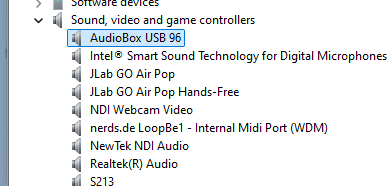
and then download a small program called MIDIEditor to make the MIDI connection work between Dashboard LoopBe1 controller & the USB 96 box to send the MIDI commands to the mixer.
Once I did that, the MIDI workflow worked like it should, I was able to create Dashboard buttons based on your code above that sends MIDI notes to trigger automations, which is really cool.
I have saved the default MIDI controller configuration to a file, does something in there need to match that Consumes address ? I have also tried dumping hidden parameters to a file, but that doesn't seem to work.
Any extra advice on this would be great, I would like to be able to bypass all the free helper apps.
Thanks much!
------------------------------
Jay Cofield
University of Montevallo- Dept of Comm
------------------------------
Original Message:
Sent: 08-05-2025 10:07
From: Jay Cofield
Subject: need help with the Dashboard MIDI controller
Thanks! I will try that out & let you know.
------------------------------
Jay Cofield
University of Montevallo- Dept of Comm
------------------------------
Original Message:
Sent: 08-05-2025 09:57
From: James Peltzer
Subject: need help with the Dashboard MIDI controller
There are several ways to get the data from the MIDI side and to update it. DashBoard was designed around a feature called "AutoWire" where you define a "Device Class" or parameters you want to have receive data from a MIDI Panel or joystick and if the MIDI config defines a parameter with the same OID as on your custom panel (and part of your mapped "Device Class") they will sync with each other.
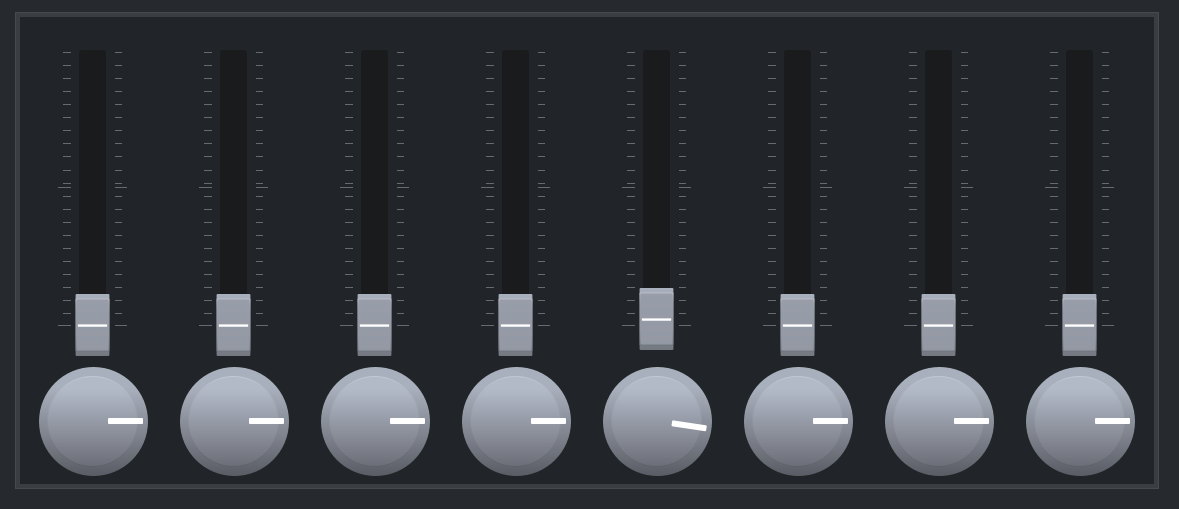
Do a search in the DashBoard User Guide for "Adding a USB Joystick" and it will walk you through all of the config pages necessary to use "Auto Wire". The trick to consuming AutoWire parameters in your custom panels is to defined a String Array parameter with OID 0xFF17. The panel below is designed to be wired to Device Class "AutoWireTest" (as defined in the panel parameter).
<abs contexttype="opengear" id="_top" style=""> <meta> <params> <param access="1" constraint="0.0;127.0;0.0;127.0;1" constrainttype="INT_STEP_RANGE" name="Fader 1" oid="AutowireTest.fader.1" precision="0" type="INT16" value="0" widget="slider-vertical-nolabel"/> <param access="1" constraint="0.0;127.0;0.0;127.0;1" constrainttype="INT_STEP_RANGE" name="Fader 2" oid="AutowireTest.fader.2" precision="0" type="INT16" value="0" widget="slider-vertical-nolabel"/> <param access="1" constraint="0.0;127.0;0.0;127.0;1" constrainttype="INT_STEP_RANGE" name="Fader 3" oid="AutowireTest.fader.3" precision="0" type="INT16" value="0" widget="slider-vertical-nolabel"/> <param access="1" constraint="0.0;127.0;0.0;127.0;1" constrainttype="INT_STEP_RANGE" name="Fader 4" oid="AutowireTest.fader.4" precision="0" type="INT16" value="0" widget="slider-vertical-nolabel"/> <param access="1" constraint="0.0;127.0;0.0;127.0;1" constrainttype="INT_STEP_RANGE" name="Fader 5" oid="AutowireTest.fader.5" precision="0" type="INT16" value="3" widget="slider-vertical-nolabel"/> <param access="1" constraint="0.0;127.0;0.0;127.0;1" constrainttype="INT_STEP_RANGE" name="Fader 6" oid="AutowireTest.fader.6" precision="0" type="INT16" value="0" widget="slider-vertical-nolabel"/> <param access="1" constraint="0.0;127.0;0.0;127.0;1" constrainttype="INT_STEP_RANGE" name="Fader 7" oid="AutowireTest.fader.7" precision="0" type="INT16" value="0" widget="slider-vertical-nolabel"/> <param access="1" constraint="0.0;127.0;0.0;127.0;1" constrainttype="INT_STEP_RANGE" name="Fader 8" oid="AutowireTest.fader.8" precision="0" type="INT16" value="0" widget="slider-vertical-nolabel"/> <param access="1" maxlength="0" name="Consumes" oid="0xFF17" precision="0" type="STRING_ARRAY" value="AutowireTest" widget="default"> <value>AutowireTest</value> </param> </params> </meta> <table height="477" left="24" style="bg#dark;bdr:etched;" top="21" width="1144"> <tr> <param colspan="1" expand="true" fill="both" oid="AutowireTest.fader.1" rowspan="1" showlabel="false" weightx="1.0" weighty="1.0"/> <param colspan="1" expand="true" fill="both" oid="AutowireTest.fader.2" rowspan="1" showlabel="false" weightx="1.0" weighty="1.0"/> <param colspan="1" expand="true" fill="both" oid="AutowireTest.fader.3" rowspan="1" showlabel="false" weightx="1.0" weighty="1.0"/> <param colspan="1" expand="true" fill="both" oid="AutowireTest.fader.4" rowspan="1" showlabel="false" weightx="1.0" weighty="1.0"/> <param colspan="1" expand="true" fill="both" oid="AutowireTest.fader.5" rowspan="1" showlabel="false" weightx="1.0" weighty="1.0"/> <param colspan="1" expand="true" fill="both" oid="AutowireTest.fader.6" rowspan="1" showlabel="false" weightx="1.0" weighty="1.0"/> <param colspan="1" expand="true" fill="both" oid="AutowireTest.fader.7" rowspan="1" showlabel="false" weightx="1.0" weighty="1.0"/> <param colspan="1" expand="true" fill="both" oid="AutowireTest.fader.8" rowspan="1" showlabel="false" weightx="1.0" weighty="1.0"/> </tr> <tr> <param colspan="1" expand="true" fill="both" oid="AutowireTest.fader.1" rowspan="1" showlabel="false" widget="wheel"/> <param colspan="1" expand="true" fill="both" oid="AutowireTest.fader.2" rowspan="1" showlabel="false" widget="wheel"/> <param colspan="1" expand="true" fill="both" oid="AutowireTest.fader.3" rowspan="1" showlabel="false" widget="wheel"/> <param colspan="1" expand="true" fill="both" oid="AutowireTest.fader.4" rowspan="1" showlabel="false" widget="wheel"/> <param colspan="1" expand="true" fill="both" oid="AutowireTest.fader.5" rowspan="1" showlabel="false" widget="wheel"/> <param colspan="1" expand="true" fill="both" oid="AutowireTest.fader.6" rowspan="1" showlabel="false" widget="wheel"/> <param colspan="1" expand="true" fill="both" oid="AutowireTest.fader.7" rowspan="1" showlabel="false" widget="wheel"/> <param colspan="1" expand="true" fill="both" oid="AutowireTest.fader.8" rowspan="1" showlabel="false" widget="wheel"/> </tr> </table></abs>
------------------------------
James Peltzer
Ross Video
Original Message:
Sent: 08-04-2025 13:55
From: Jay Cofield
Subject: need help with the Dashboard MIDI controller
Thanks for the help on this, I have confirmed that my audio mixer is receiving the MIDI CC on channel 0, so my follow up question is how do I connect the changes in values I make to channel 0? It may be a pretty basic question, but I'm new to MIDI and all the MIDI guides on the Web aren't helping.
I can see the OID's for Buttons & Continous Controllers change according to slider or button inputs:
But when I'm in the editor, I'm not sure which parameter to use, and then how to get that to leave Dashboard & hit the USB-MIDI interface.
------------------------------
Jay Cofield
University of Montevallo- Dept of Comm
Original Message:
Sent: 07-29-2025 11:40
From: Jay Cofield
Subject: need help with the Dashboard MIDI controller
Thanks- that helps, I'll check it out. Our Midas Pro-X is pretty basic on how it handles MIDI anyways. It will allow me to trigger a scene change if it receives MIDI, any MIDI, but not necessarily a smooth volume slider change.
-Jay
Original Message:
Sent: 7/29/2025 9:46:00 AM
From: James Peltzer
Subject: RE: need help with the Dashboard MIDI controller
Hi Jay
DashBoard only sends basic MIDI CC and Note commands on channel 0 - it does not support extended MIDI commands or other channels so the first thing to check would be to make sure your device is set to the correct channel and basic MIDI.
------------------------------
James Peltzer
Ross Video