Thanks Travis. Did not know this part..
It works.
I did not thought it will be for MOS shots only though. I was under the impression we could "quick code" the whole show with keywords...
In Overdrive Server Services, what does NRCS Quickshot used for ?
Thanks
------------------------------
Nick Morneau
Control Room Support
BELL MEDIA - Montreal
Canada
------------------------------
Original Message:
Sent: 02-03-2025 11:47
From: Travis Hawkins
Subject: Overdrive Quick Code Template
Hi Nick - Have you gone into TemplateEditor > Tools > Configure MOS Video Server Templates. In here you will see each device and columns. The far right column is labelled Allow QuickCode. If there is an 'X' then it is not allowed to be used for a QuickTemplate. To allow the device to be used for a QuickTemplate please do the following: Highlight the device by clicking on the title > look to the far right to find a button labelled: Enable QuickCode > click button. There should be a checkmark replacing the 'X'. Click 'OK' to exit and try to create your QuickCode Template, again.
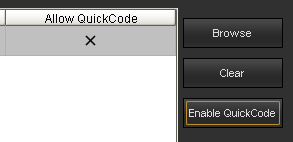
Please let me know if this was helpful or not.
Thanks and have a great day.
------------------------------
Travis Hawkins
Ross Video
[Phone]
------------------------------