Hello Andreanne. Thank you for your response! I have tried various settings on the very setting you recommended. But unfortunately it doesn't exhibit the behaviour I was looking for. It would be a great feature to have the ability to toggle on and off "Autoscroll" for the active bar. This feature would give the end user full control of the active screen behaviour and make split decision reactions when needed as the information needed would be right in front of the operator without the need to scroll up or down to find what you need. Maybe in a future version of Overdrive.
------------------------------
Roy Silveira
Sr. Production Automation Director
Bell Media
------------------------------
Original Message:
Sent: 08-05-2025 05:40
From: Andreanne Tremblay
Subject: Rundown Control Behaviour
Hello Roy,
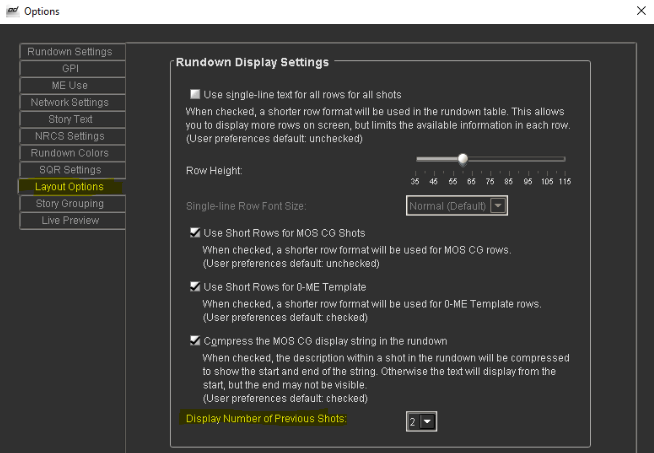
There is one setting that is not exactly what you ask, but may help in your situation, it allows you to select how many previous shot Rundown Control keeps in focus.
You can find it in the Tools -> Options -> Layout Options.(Picutre below). Hope this helps!
------------------------------
Andreanne Tremblay
OverDrive Product Prime
Ross Video
Reading, United Kingdom
------------------------------